To go to the beginning of text messages on iPhone, open the conversation in Messages and tap the clock at the top of the screen. The thread jumps up to the oldest messages currently loaded. In a long conversation, older messages then load in, so you keep tapping until you reach the first one.
There is no single button that jumps straight to the first text in a conversation that spans years. If you need one specific message, searching is usually much faster than scrolling. This guide covers both methods, how to find old photos and links, and what to do when older messages won’t appear.
Where the steps differ between iOS versions, each version is shown separately.
Which method should you use?
| Your goal | Fastest method |
|---|---|
| Read a conversation from the very start | Tap the clock at the top of the screen, repeatedly |
| Find one specific old message | Search Messages for a word you remember from it |
| Find old messages from one person | Search their name, then add a keyword |
| Find an old photo, link or document | Tap the contact’s name and browse Photos or Links |
| Older messages seem to be missing | Check Keep Messages and Messages in iCloud |
How to Go to the Beginning of a Text Conversation on iPhone
The quickest way to scroll to the top of a conversation is the status bar, the strip at the very top of the screen that shows the time, signal and battery.
- Open the Messages app.
- Tap the conversation you want to read from the start.
- Tap the clock at the top of the screen. On iPhones with Face ID, it sits in the top-left corner. On iPhones with a Home button, it is in the center.
- Wait a moment while older messages load above, then tap the clock again.
- Repeat until no more messages load. You’re now at the earliest message saved on your iPhone. If older texts were deleted, or removed by the Keep Messages setting, this may not be the first message you ever exchanged.
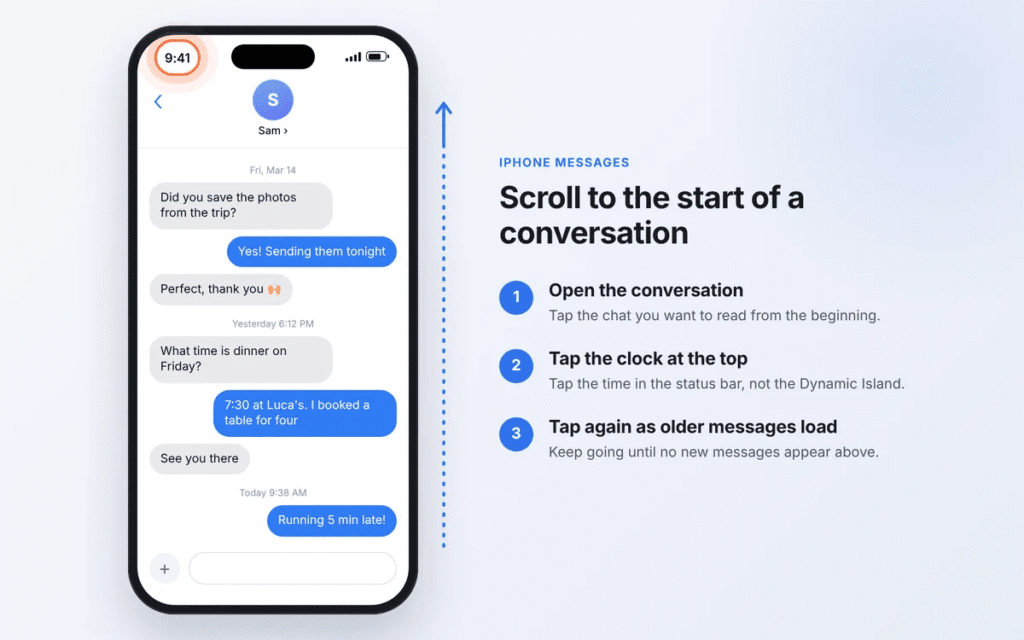
On iPhones with a Dynamic Island, tap the clock rather than the Dynamic Island itself. Tapping the island opens any Live Activity that is running, such as a timer or a delivery tracker.
How to get to the top of your conversation list
Tapping the clock on the main Messages screen scrolls your list of conversations back to the top. That list is sorted newest first, so the top shows your pinned chats and most recent conversations, not your oldest ones. To reach old conversations, scroll down instead, or search for the person’s name.
Why One Tap Won’t Take You to Your First Message
Messages doesn’t load an entire conversation at once. It loads recent messages first and pulls in older ones in batches as you scroll up. Tapping the clock scrolls to the top of the current batch, so in a thread with years of texts and thousands of photos, you may need to tap dozens of times to scroll to the first message on iPhone.
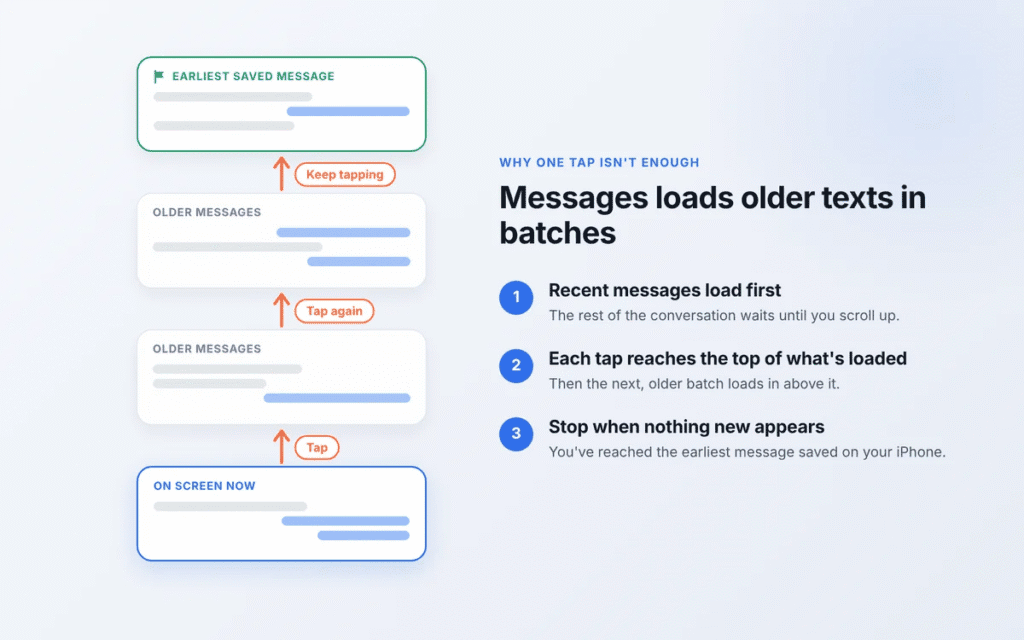
That’s why some older guides that promise an instant jump to the very first message are wrong. The tap only takes you as far as what has already loaded.
A few things make the trip faster:
- Update to iOS 27. Faster message loading is on Apple’s list of iOS 27 improvements to Messages, as reported by 9to5Mac.
- Stay on Wi-Fi. If you use Messages in iCloud, older messages and attachments may need to download as you scroll.
- Give each batch a second to load before tapping again, or the view may stop in the same place.
- Search instead of scrolling if you are after one particular message. The next section shows how.
- Use a Mac or iPad for very long threads. With Messages in iCloud, the same history appears there, and a trackpad or larger screen makes scrolling quicker.
How to Find Old Text Messages on iPhone Without Scrolling
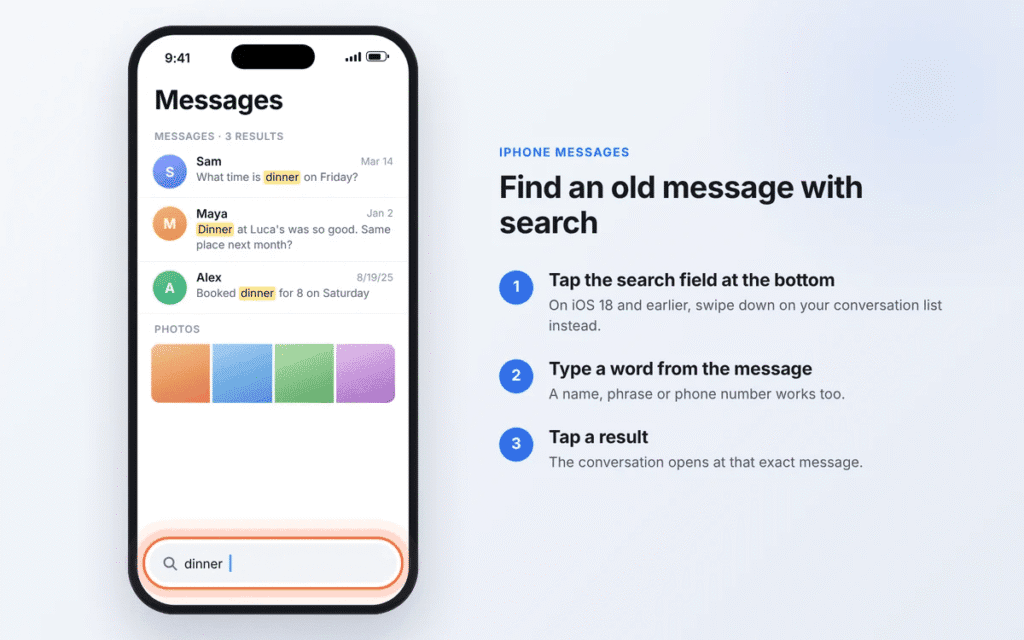
If you remember any word from the message you want, iPhone Messages search will take you straight to it. Tapping a result opens the conversation at that exact message, and you can scroll up or down from there for context. Apple’s own guide to searching Messages covers the same steps.
iOS 27 and iOS 26
- Open Messages and go to your list of conversations.
- Tap the search field at the bottom of the screen.
- Type a word, phrase, name or number, then tap Search.
- Tap a result to open the conversation at that message.
iOS 18 and earlier
- Open Messages and go to your list of conversations.
- Swipe down on the list to reveal the search field at the top.
- Type what you’re looking for and tap Search.
- Tap a result to jump to that message.
Narrow your results with filters
Since iOS 17, you can combine filters to cut a long list of results down to the one you need. As you type, Messages suggests filters such as messages with a specific person, photos, links or a keyword. Tap one, then keep typing to add another.
Photo search also recognizes what’s in an image. Searching “dog”, “receipt” or “beach” can surface photos that were never captioned.
What’s new in iOS 27
Apple’s iOS 27 feature list includes two search improvements for Messages, as reported by MacRumors:
- You can search for a conversation by phone number or by a contact’s nickname, not just their saved name.
- Search can find photos and videos offloaded to iCloud, and those files now display thumbnails.
On iPhones that support Apple Intelligence, iOS 26 and later also let you search in natural language, such as “photos Sam sent from the wedding”.
Tip: To find the start of a conversation, search for something you likely said early on. Introductions, “nice to meet you”, a first meetup spot or the reason you swapped numbers are good bets.
How to Search Messages From a Specific Person
To search messages from a specific person, filter by their name first, then add a keyword.
- Open the search field in Messages (bottom of the screen in iOS 26 and 27, swipe down in iOS 18).
- Type the person’s name.
- Tap the Messages with [name] suggestion. It becomes a filter in the search field.
- Type a keyword to search only that person’s messages.
- Tap a result to open the conversation at that point.
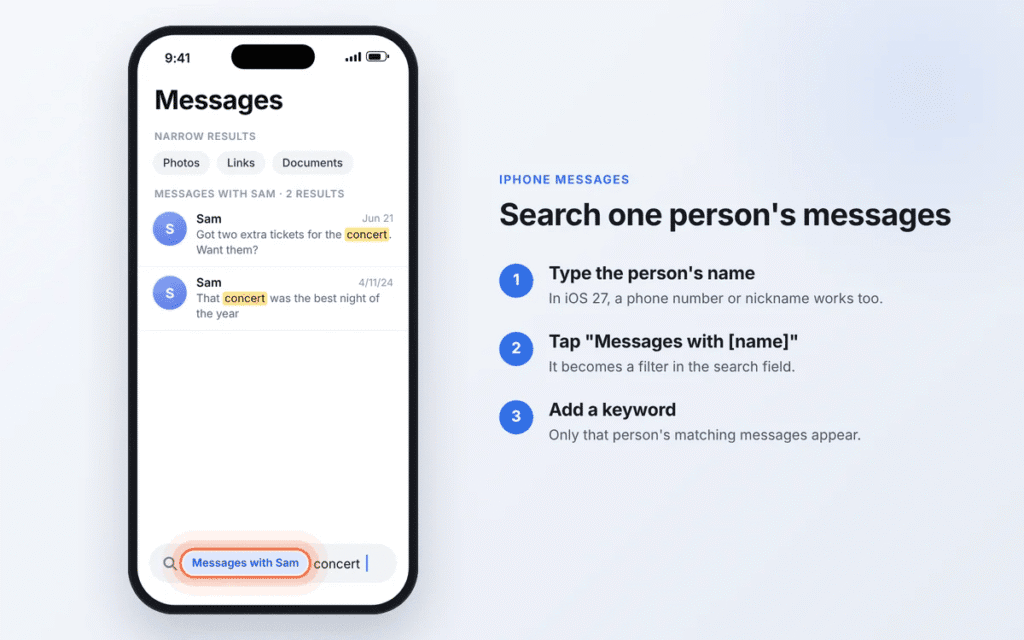
In iOS 27, you can also type the person’s phone number or the nickname saved on their contact card.
How to find the oldest text message from someone
Messages can’t sort search results from oldest to newest, so there are two practical routes:
- Scroll the thread to the top using the status bar method above. This is the only way to be certain you’ve reached the very first message.
- Search for early words. A greeting, a first meeting place or the event where you met will often land you near the beginning.
If the person changed their phone number, or messaged you from an email address at some point, their older texts may sit in a separate conversation. Search for the old number or email to find it. Group chats are also kept apart from your one-to-one thread with that person.
How to Find Old Photos and Links in Messages
You don’t need to scroll through a conversation to find an old photo, link or file. Every conversation keeps them in one place.
- Open the conversation.
- Tap the person’s or group’s name at the top of the screen. On iOS 14 or earlier, tap the Info button instead.
- Swipe left or right through the categories and tap one, such as Photos, Links or Documents.
- Touch and hold any item to Save, Copy, Share or Delete it.
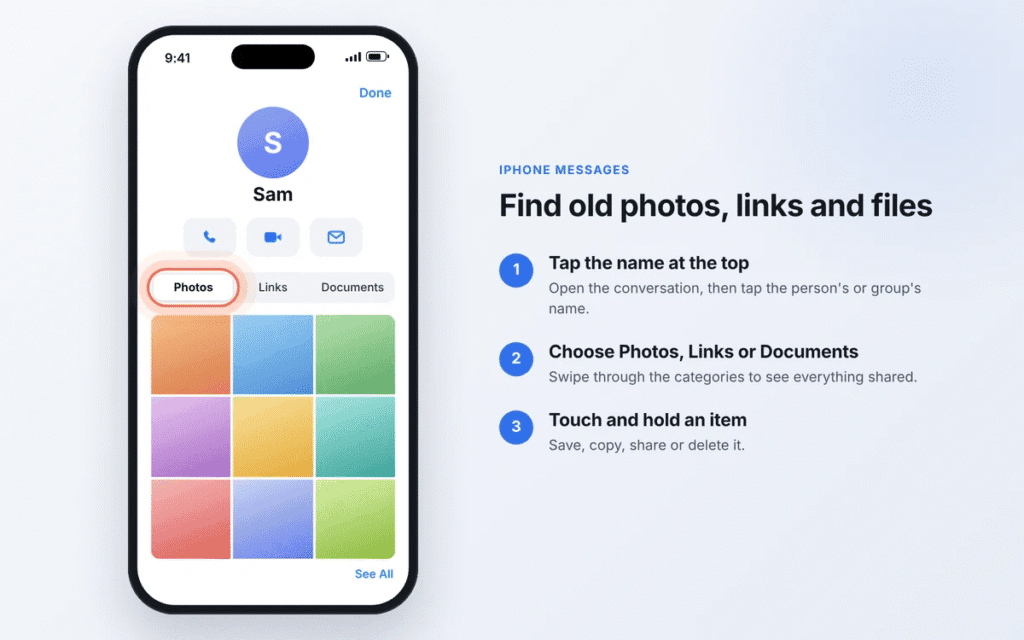
To look across all your conversations at once, use Messages search and tap the Photos or Links filter.
In iOS 27, photos and videos that were offloaded to iCloud to save space show proper thumbnails and appear in search results, so older media is much easier to spot.
Other Ways to See Old Messages on iPhone
Spotlight Search
Spotlight can find messages without opening the Messages app first.
- On your Home Screen, swipe down from the middle of the screen, or tap the Search button above the Dock.
- Type a word, name or number from the message.
- Look for results under Messages and tap one to open it.
Spotlight shows a limited number of results, so for a thorough search, use the search field inside Messages.
Messages on a Mac, iPad or an exported copy
With Messages in iCloud turned on, your Mac and iPad show the same history as your iPhone, and a trackpad makes scrolling through years of messages much quicker. To read or keep a whole thread from the first message, computer apps such as iMazing can export a conversation from an iPhone backup as a PDF. These are paid third-party tools, so check the price and privacy terms first.
Why Can’t I See Older Text Messages on My iPhone?
If scrolling stops too early or search can’t find a message you know exists, one of these is usually the cause.
| Cause | How to fix it |
|---|---|
| Keep Messages is set to 30 Days or 1 Year | Go to Settings > Apps > Messages > Keep Messages and choose Forever (on iOS 17 and earlier: Settings > Messages). Messages already removed by the old setting don’t come back. With Messages in iCloud on, this setting applies to all your devices. |
| Messages in iCloud is off or still syncing | Go to Settings > [your name] > iCloud > See All > Messages in iCloud and turn on Use on this iPhone (Apple’s steps). A large history can take hours or days to download, so keep the iPhone on Wi-Fi and charging. |
| iCloud storage is full | Syncing can pause when iCloud runs out of space. Free up storage or upgrade your plan, then let Messages finish syncing. |
| Search says it’s still indexing | Restart the iPhone, install any iOS update and make sure it has free storage. Then leave it on Wi-Fi and charging overnight so indexing can finish. If it stays stuck, some users report that turning off the options in Settings > Apps > Messages > Search, restarting, then turning them back on fixes it. Apple doesn’t document this workaround. |
| You deleted the conversation recently | In Messages, tap the Filters button, then Recently Deleted (on iOS 18, tap Edit instead). Choose the conversation and tap Recover. Apple says you can recover messages deleted within the last 30 to 40 days (Apple’s guide). |
| You deleted it more than 40 days ago | Messages deleted after the Recently Deleted period generally can’t be recovered in the Messages app. An older backup might help if it was made before the deletion and includes the conversation. If Messages in iCloud was on, iCloud Backup doesn’t include your texts, so restoring one is unlikely to bring them back. Restoring also replaces what’s on your iPhone now. |
| The person changed their number or email | Their older texts may be in a separate conversation. Search for the old number or email address. |
Frequently Asked Questions
Can you jump to the first text message on an iPhone?
Not with a single tap. Tap the clock repeatedly as older messages load, or search for a word from your earliest messages to land near the start.
How do you scroll through years of messages quickly?
Pause briefly between status-bar taps so each batch loads, update to iOS 27 (which lists faster message loading among its improvements), or scroll on a Mac or iPad with Messages in iCloud.
Can you search iPhone messages by date?
No. Messages search has no date filter. Search for a word tied to that time instead, such as a holiday, trip or event, or open the conversation and scroll to that period.
How do I find the oldest message from someone?
Scroll your conversation with them to the top as described above. If they changed numbers, search the old number too, since those texts may be in a separate thread.
Why are my old iPhone messages missing?
Usually it’s the Keep Messages setting, Messages in iCloud still syncing, full iCloud storage or search still indexing. The troubleshooting table above has the fix for each.
What does the arrow in the top corner of a conversation do?
In iOS 17 and later, the catch-up arrow appears when you have unread messages higher up in a conversation. Tapping it jumps to the first message you haven’t read, not to the start of the conversation.
Does tapping the top of the screen work in other apps?
Yes. Tapping the status bar scrolls to the top in almost every iPhone app with a scrolling list, including Mail, Safari, Photos and Settings.
Can I read my text messages on iCloud.com?
No. Messages in iCloud syncs your texts between your iPhone, iPad and Mac, but there is no way to view them on the iCloud website.
Conclusion
The simplest way to go to the beginning of text messages on iPhone is to open the conversation and tap the clock at the top of the screen, repeating as older messages load. For one specific message, search is faster: type a word you remember, add a person or content filter, and tap the result to jump straight there.
If older messages won’t appear at all, check the Keep Messages setting and Messages in iCloud before assuming they’re gone. Deleted conversations can be recovered from Recently Deleted for 30 to 40 days.

Louis Mugan is a seasoned technology writer with a talent for turning complicated ideas into clear, practical guidance. He focuses on helping everyday readers stay confident in a world where tech moves fast. His style is approachable, steady, and built on real understanding.
He has spent years writing for platforms like EasyTechLife, where he covers gadgets, software, digital trends, and everyday tech solutions. His articles focus on clarity, real-world usefulness, and helping people understand how technology actually fits into their lives.
Outside of his regular columns, Louis explores emerging tools, reviews products, and experiments with new tech so his readers don’t have to. His steady, friendly approach has made him a reliable voice for anyone trying to keep up with modern technology. get in touch at louismugan@gmail.com