Smart TV

Fire TV’s New Alexa Plus Scene Search Lets You Jump Straight To The Moment You Remember

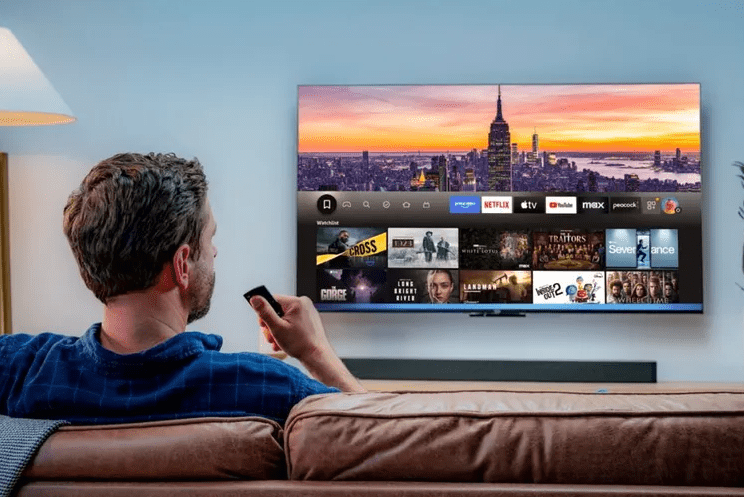
Finding that one memorable movie moment used to mean lots of guessing and scrubbing along the timeline. Amazon is changing that on Fire TV with a new Alexa Plus feature that lets you jump directly to a scene just by describing it out loud. Instead of scrolling, you speak in natural language and Prime Video skips to the exact moment in seconds. Below is an updated, fact checked breakdown of how the feature works, what you need to use it, and why it matters for everyday streaming. Key points What the new Alexa Plus scene search actually does On a Fire TV device, you can press the Alexa button on the remote and say something like: Alexa Plus parses that request, finds the matching scene inside a compatible Prime Video movie, and starts playing that moment almost immediately. There is no need to remember the timestamp or slowly fast forward through the film. Because the system can use dialogue and context, you can even quote a line instead of naming the movie. For example, Amazon shows examples such as asking for the scene where Joshua says “shall we play a game” in WarGames, or when John McClane says “come out to the coast, we will get together, have a few laughs” in Die Hard. How Alexa Plus finds the right scene Under the hood, the feature combines several layers of metadata and artificial intelligence. Because of this combination of captions, visual cues, and rich metadata, Alexa Plus can often figure out what movie you mean even if you never say the title. You might just describe the action or the character and the system still lands on the right scene. Where it works and what you need At launch, the new scene search is limited in a few important ways: Because these details are evolving, especially the pricing and regional availability of Alexa Plus, there may be differences between countries or between early access and the final roll out. Based on the available data, the core requirement is that you have a Fire TV device that supports Alexa Plus and that you are watching a compatible Prime Video title. Why this feature matters for everyday streaming The new scene search is designed to fix a very specific annoyance. When you want to show someone your favorite moment in a movie, you often end up wasting several minutes scrubbing around and overshooting the point you wanted. Amazon’s idea is that you should just describe the scene the same way you would describe it to a friend and let AI do the work. There are a few practical benefits: At the same time, it also serves as a real world showcase of how multimodal AI and rich metadata can change the way people browse long form video, not only through recommendations but through precise scene level control. Conclusion Amazon’s new Alexa Plus scene search on Fire TV is a small feature with a clear aim: remove the friction between remembering a movie moment and actually watching it. By combining Prime Video captions, X Ray style metadata, and large language models on Amazon Bedrock, the system can understand natural language descriptions and jump directly to the matching scene in thousands of supported films. Right now it works only with Prime Video movies on supported Fire TV devices and is tied to the Alexa Plus tier, which is still rolling out and may become a separate subscription. Even so, if you already spend a lot of time with Fire TV and Prime Video, this AI powered shortcut could make revisiting favorite scenes feel far more effortless than scrubbing along a timeline ever did. Louis MuganLouis Mugan is a seasoned technology writer with a talent for turning complicated ideas into clear, practical guidance. He focuses on helping everyday readers stay confident in a world where tech moves fast. His style is approachable, steady, and built on real understanding. He has spent years writing for platforms like EasyTechLife, where he covers gadgets, software, digital trends, and everyday tech solutions. His articles focus on clarity, real-world usefulness, and helping people understand how technology actually fits into their lives. Outside of his regular columns, Louis explores emerging tools, reviews products, and experiments with new tech so his readers don’t have to. His steady, friendly approach has made him a reliable voice for anyone trying to keep up with modern technology. get in touch at louismugan@gmail.com
Visual comparison showing a smartphone with noticeable black border bezels on the left compared with an ultra-thin bezel-less screen display on the right.

What Is a Bezel? Bezel vs. Bezel-Less Displays Explained

A bezel is the frame around a screen. “Bezel-less” rarely means there is no frame at all. It usually means the frame is so thin that the display seems to reach the edges of the device. Put an older phone or laptop next to a new one and the difference is obvious: the screen fills far more of the front. Thinner bezels are a big part of that change. But bezels are not just decoration. They protect the panel, hold cameras and sensors, and give your hands somewhere to rest. Whether thinner is better depends on the device and how you use it. What Is a Bezel? A bezel is the border between a device’s screen and its outer edge. On a phone, it is the strip around the touchscreen. On a laptop, it is the frame around the panel in the lid. On a monitor or TV, it is the visible edge around the picture. The bezel is not part of the screen. The screen, or active display area, is where the image appears. The bezel surrounds it, and it can be thick, thin, or colored to blend in with the rest of the device. What Does Bezel-Less Mean? “Bezel-less” describes a screen with a very thin border, not one with no border. The goal is to fit a larger screen into roughly the same size body, which raises the screen-to-body ratio: the share of the front surface taken up by the display. Manufacturers use several names for the same idea: The border you see when the screen is on Many modern displays have two borders: the physical frame you can see when the device is off, and an inactive black strip inside the glass, around the edge of the panel, that never lights up. In product photos and when the screen is off, the two can look like one thin line. When the screen is on, the inactive strip becomes visible, so the border looks thicker than it did in the marketing images. To judge the real border, turn the screen on and measure from the outer edge of the device to the first lit pixels, or look for reviews that measure it this way. Why Do Devices Have Bezels? Bezels exist for three practical reasons. Advantages of Thin Bezels The main benefit of thin bezels is more screen for the same size device. Disadvantages of Thin Bezels Thinner bezels involve trade-offs, and they are not right for every device. How Bezels Differ Across Devices How much bezel size matters depends on how you hold, carry or view the device. Device What the bezel usually holds Main benefit of a thinner bezel Main reason to keep some bezel Smartphone Front camera, sensors, earpiece Bigger screen in a pocketable body Fewer accidental edge touches Tablet Front camera, display edge More screen area Room to grip with your thumbs Laptop Webcam, microphones, hinge structure Larger screen in a smaller lid A better-placed, better-quality webcam Monitor Display edge and housing Smaller gaps in multi-screen setups Little reason beyond cost TV Display housing and frame More immersive picture Little reason beyond cost Smartphones and Tablets Early smartphones had wide top and bottom bezels for physical home buttons, speakers and cameras. Over the past decade, home buttons disappeared, speakers shrank, and front cameras moved into notches, punch-holes, and in some phones under the display. Thin bezels are now common on smartphones, though their thickness still varies by model and price range. Tablets are the exception. They are held in two hands, often by the edges, so a modest border prevents stray touches. A tablet with slightly wider bezels is often more comfortable than one that pushes the screen to the edge. Laptops On a laptop, the top bezel matters most because it holds the webcam and microphones. Thin side bezels let manufacturers fit a bigger screen into a smaller lid, which helps portability. Bezel size tells you nothing about the panel itself. Judge a laptop display by its resolution, brightness, color accuracy and refresh rate, and check where the webcam sits before you buy. Monitors Thin bezels pay off most when you place monitors side by side. Two thick-bezel monitors leave a wide dark strip down the middle of your workspace, while thin bezels keep the gap small. This helps for coding, editing, trading and gaming setups. Monitors sold as “borderless” still show an inactive black edge when switched on, so compare the measured gap, not the marketing name. TVs TVs can have the thinnest bezels of all because nobody holds them. Samsung, for example, markets its Infinity Screen TVs as nearly bezel-less. Still, bezel size should be a minor factor when you buy a TV. Picture quality, panel type, brightness, HDR support, viewing angles and software matter far more. If you want to get more from the TV you already own, see our guide to boosting Smart TV picture quality. How to Choose the Right Bezel Design Treat bezel size as a design preference, not a measure of quality. A thin bezel improves some devices and makes others harder to use. Buyer checklist Frequently Asked Questions What is a bezel on a screen? A bezel is the border around the display of a phone, tablet, laptop, monitor or TV. It sits between the active screen area and the outer edge of the device. What does bezel-less mean? Bezel-less means the border around the screen is very thin. It does not mean the device has no frame at all. Are bezel-less screens better? Not always. Thin bezels give you more screen in a smaller body, but they can cause accidental touches, leave less room to grip a tablet, and push laptop webcams into worse positions. What is a bezel on a laptop? It is the frame around the screen in the laptop’s lid. The top bezel usually holds the webcam and microphones. Why do monitors have thin bezels? Thin bezels reduce the gap between screens placed side by side, which makes multi-monitor

Scroll to Top