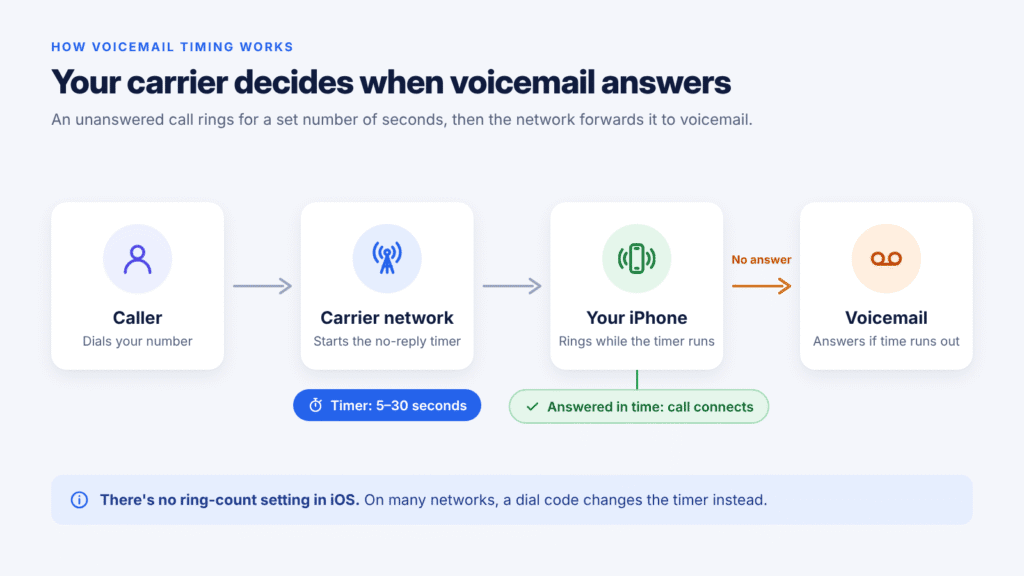
There’s no setting on your iPhone that changes the number of rings before voicemail. Your wireless carrier controls that, and it counts in seconds, not rings. On many networks you can still change it yourself with a short dial code, usually to anything up to 30 seconds.
This guide shows you how to make your iPhone ring longer before voicemail, how the steps differ on AT&T, Verizon, T-Mobile and UK networks, and how to fix calls that go to voicemail after only one or two rings.
Quick answer: If your carrier supports standard call-forwarding codes (Verizon doesn’t), open the Phone app and dial *#61# to see your voicemail number. Then dial **61*[that number]*11*30# and tap Call to set a 30-second ring time. Both codes depend on your carrier: some networks don’t accept them, and some use a slightly different format, listed in the carrier table below. If either code returns an error, contact your carrier. On AT&T, calling support is the official route.
Can You Change the Number of Rings on an iPhone?
Not from iPhone Settings. iOS has no option for ring count or voicemail delay. Apple Community volunteers give the same answer: it’s a carrier setting, not an iPhone setting.
Here’s why. Voicemail runs on your carrier’s network, not on your phone. When a call comes in, the network rings your iPhone for a set time. If you don’t answer, the network forwards the call to its voicemail system. This is called call forwarding when unanswered (or “no reply”).
Three things follow from that:
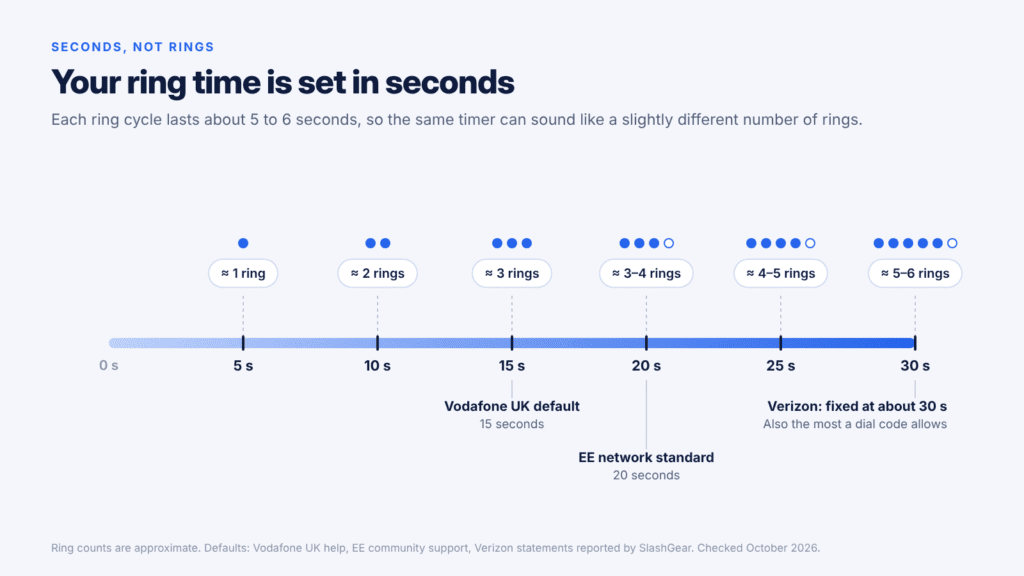
- It’s measured in seconds, not rings. One ring lasts about 5 to 6 seconds, so 30 seconds is roughly five or six rings.
- Your ringtone doesn’t change it. A longer ringtone just repeats less often within the same time limit.
- The default depends on your carrier. Most networks ring for about 20 to 30 seconds. Verizon’s network sends calls to voicemail after about 30 seconds, and customers can’t change it themselves.
So the real question isn’t “where’s the iPhone setting?” It’s “does my carrier let me change the no-reply timer, and how?”
How to Make Your iPhone Ring Longer Before Voicemail
On networks that support it, two dial codes from the Phone app let you increase (or shorten) your iPhone’s ring time in about a minute. You can pick 5, 10, 15, 20, 25 or 30 seconds. Thirty is the maximum the code accepts.
A note on Live Voicemail
Live Voicemail (iOS 17 and later) answers missed calls on the iPhone itself, and whether you have it depends on your country, language and carrier. You don’t need to turn it off to change your ring time. But if the new time doesn’t take effect, Live Voicemail may be overriding your carrier’s forwarding. Verizon’s support page lists conditional call forwarding among the features that need Live Voicemail turned off.
In that case, go to Settings > Apps > Phone > Live Voicemail and switch it off. On iOS 17 the path is Settings > Phone > Live Voicemail.
Change the ring time with dial codes
Important: If your carrier is listed in the carrier table below, use its own code. Not every network accepts the standard format shown here.
- Open the Phone app and tap Keypad.
- Dial
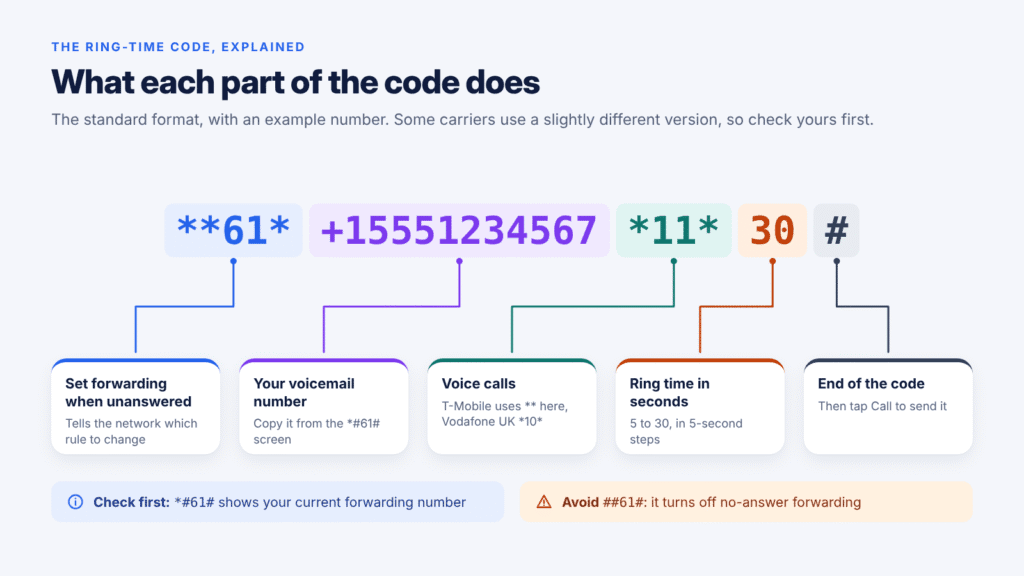
*#61#and tap Call. If your carrier supports the code, a screen shows the forwarding status for unanswered calls. If forwarding is set up, it also shows a destination number, which is usually your carrier’s voicemail number. Write it down exactly, including the + sign. - Dial
**61*, then that number, then*11*, then the seconds you want, then#. For 30 seconds it looks like this:**61*+15551234567*11*30#. To type +, press and hold 0. - Tap Call. A confirmation message should appear.
- Test it. Call your iPhone from another phone and time how long it rings.
This method is described step by step in iClarified’s long-running iPhone tutorial, and an accepted solution on AT&T’s community forum uses the same code.
Some carriers publish a slightly different format. T-Mobile’s official code puts two asterisks (**) before the seconds instead of *11*, as in **61*18056377243**30#. Vodafone UK’s uses *10* instead of *11*. If the standard code fails, use your carrier’s version from the next section.
Don’t use ##61# to “reset” the timer. T-Mobile describes it as turning off forwarding if no reply. Removing that forwarding can disrupt carrier voicemail, so unanswered calls may not reach your mailbox until it’s set up again. To go back, repeat step 3 with your old time, or ask your carrier to restore its default. On T-Mobile, ##004# resets call forwarding to default.
Change iPhone Voicemail Ring Time by Carrier
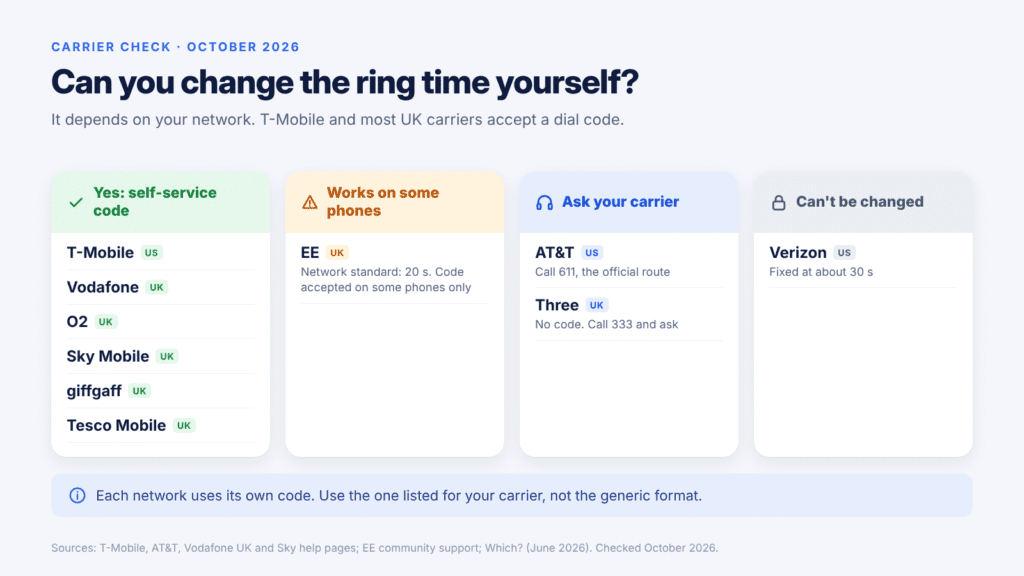
T-Mobile and Vodafone UK publish self-service codes, and Which? lists codes for EE, O2, Sky Mobile, giffgaff and Tesco Mobile. AT&T’s official route is its support team, Verizon doesn’t allow changes, and Three has no code. Each carrier name below links to its source.
| Carrier | Change it yourself? | How |
|---|---|---|
| T-Mobile (US) | Yes | Dial **61*18056377243**[seconds]#, using 5 to 30 seconds. Note the two asterisks before the seconds, with no *11*. |
| AT&T (US) | Through support (official) | Call 611 or 800-331-0500 (AT&T Prepaid: 800-901-9878). Some users report the standard code works, but AT&T doesn’t document it. |
| Verizon (US) | No | Fixed at about 30 seconds, with no self-service code. |
| Vodafone (UK) | Yes | Dial **61*121*10*[seconds]#. The default is 15 seconds. |
| O2 (UK) | Yes | Dial **61*901*11*[seconds]#. If the code fails, contact O2. |
| EE (UK) | Yes, on some phones | Dial **61*07953222222**[seconds]#. The network default is 20 seconds (see below). |
| Sky Mobile (UK) | Yes | Dial **61*44310*11*[seconds]#. |
| giffgaff (UK) | Yes | Dial **61*443*10*[seconds]#. If it fails, ask a giffgaff agent in the app. |
| Tesco Mobile (UK) | Yes | Dial **61*905*11*[seconds]#. |
| Three (UK) | No code | Call 333 and ask. |
AT&T: The official AT&T voicemail FAQ says to contact AT&T if you want more time before voicemail, so start there: call 611 and ask an agent to set the longest ring time. The standard code from the previous section is an unofficial alternative that some AT&T users report works.
Verizon: You can’t extend the ring time, and support generally can’t either. SlashGear notes Verizon’s suggested alternatives include a more attention-grabbing ringtone or a third-party voicemail app.
EE: Which? lists **61*07953222222**[seconds]# for EE. EE’s community support team says the network standard is 20 seconds, and that some phones accept a code to change it while others don’t. So test with a call after dialing. If it doesn’t stick, the accepted solution in an EE community thread uses **61*+447953222222*11*30#.
On a smaller network? Budget brands run on one of the big networks, but their voicemail numbers and codes can differ from the host’s. Sky Mobile, giffgaff and Tesco Mobile all use O2’s network (Sky’s own help page calls it Virgin Media O2), yet each has its own code in the table above. Elsewhere, dial *#61# to get your own voicemail number, use it in the standard code, and check your provider’s help pages if it fails.
If your carrier doesn’t allow longer ring times, ask whether turning off voicemail would help. On some networks the phone then rings longer, but how long varies by carrier, and callers can’t leave messages. For example, EE customers can text VM OFF to 150, and O2 customers can call 1760.
How to Check Your Current Voicemail Ring Time
Dial *#61# and tap Call. The screen shows where unanswered calls are forwarded, and on many networks it also shows the current delay in seconds. If it shows a number but no time, use the timing test below.
Time it. Call your iPhone from another phone and count the seconds until voicemail answers. Divide by about 5 to get the number of rings. The caller may hear a ring more or less than your iPhone plays, because the two aren’t perfectly in sync.
Check for a full divert too. Dial *#21# to see whether unconditional forwarding is on. If it is, calls skip ringing entirely, and no ring-time change will help until you turn it off.
Why Does My iPhone Go to Voicemail After One or Two Rings?
If calls reach voicemail almost immediately, the ring time usually isn’t the problem. Something is sending the call to voicemail before the timer runs out. These are the most common causes:
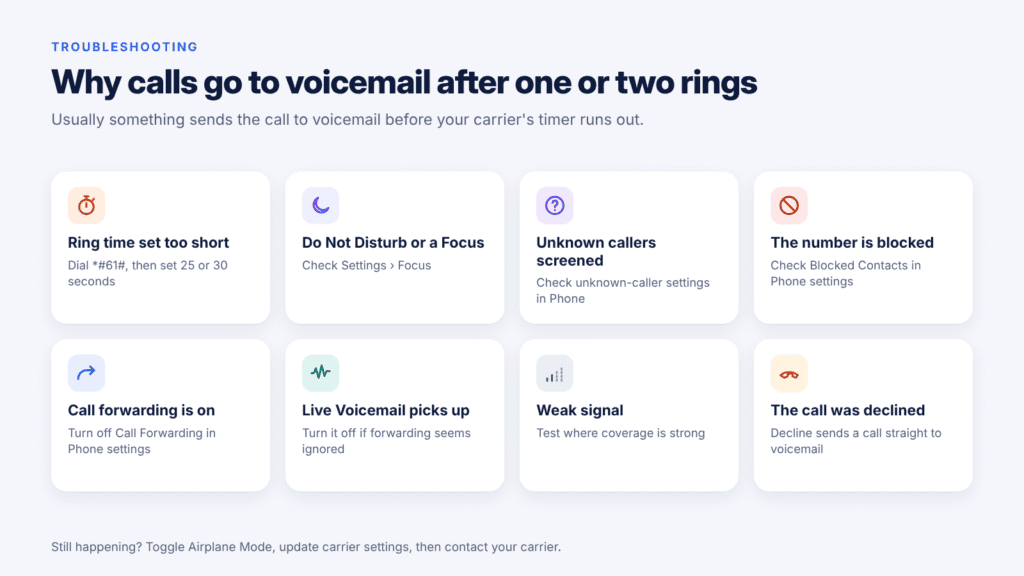
- The ring time was set too short. The code counts seconds, not rings. Entering
5gives you about one ring. - Do Not Disturb or another Focus is on. Calls from people not on your allowed list go straight to voicemail.
- Unknown callers are being silenced or screened. If Screen Unknown Callers (or Silence Unknown Callers) is active, numbers not in your contacts don’t ring normally.
- The number is blocked. Calls from blocked contacts go to voicemail without ringing.
- Call forwarding is on. Unconditional forwarding sends every call away before your iPhone rings.
- Live Voicemail is picking up. It can take over from your carrier’s no-answer forwarding.
- Weak signal. If the network can’t reach your iPhone, the ring timer never starts, as Selectra explains.
- The call was declined. Tapping Decline, or pressing the side button twice, sends a call to voicemail at once.
Calling someone and it goes to voicemail after one ring?
One ring alone doesn’t tell you why. The other person may have declined the call, turned on Do Not Disturb, lost signal, switched their phone off, or blocked your number. Try again later or send a text before assuming you’ve been blocked.
How to Stop iPhone Calls Going Straight to Voicemail
Work through these checks in order and test with a call after each one. Steps 1 to 6 come from Apple’s guide for calls that fail or don’t come in.
- Toggle Airplane Mode. Turn it on, wait five seconds, then turn it off.
- Turn off Do Not Disturb. Go to Settings > Focus > Do Not Disturb and make sure it’s off. Check any other Focus you use, too.
- Check blocked numbers. Go to Settings > Apps > Phone > Blocked Contacts and remove anyone who shouldn’t be there.
- Turn off Call Forwarding. Go to Settings > Apps > Phone > Call Forwarding and make sure it’s off.
- Check unknown-caller settings. In Settings > Apps > Phone, find Screen Unknown Callers or Silence Unknown Callers, depending on your iOS version and region. Set it to Never or off if unknown numbers should ring. Adding a caller to Contacts also makes sure they ring through.
- Update and reset. Install any carrier settings update and iOS update. As a last resort, go to Settings > General > Transfer or Reset iPhone > Reset > Reset Network Settings. This removes saved Wi-Fi networks and passwords, plus VPN and APN settings you’ve used before. It doesn’t delete your apps, photos or other data.
- Turn off Live Voicemail at Settings > Apps > Phone > Live Voicemail if your carrier’s forwarding seems to be ignored.
- Set the ring time again. Dial
*#61#to check it, then use your carrier’s code to set 25 or 30 seconds. - Contact your carrier. Ask it to check for outages, account blocks or errors on its system.
If the ring-time code fails: Which? notes that Wi-Fi Calling or 4G/5G Calling can block these codes. Turn off Wi-Fi Calling, dial the code, then turn it back on. If you use two lines (dual SIM or eSIM), repeat the code on each line, because the setting belongs to the number.
Frequently Asked Questions
How do I make my iPhone ring longer before voicemail?
On networks that support it, use the two dial codes in the steps above to set up to 30 seconds. On AT&T, call support. On Verizon, it can’t be changed.
What is the maximum ring time before voicemail?
Thirty seconds on networks that use the dial code. T-Mobile and Vodafone UK both list 5 to 30 seconds, in 5-second steps.
How many rings before voicemail on an iPhone?
It depends on your carrier’s ring time. Most networks ring for about 20 to 30 seconds, which is roughly four to six rings, because each ring cycle lasts about 5 to 6 seconds. The count can vary slightly from call to call.
Can I shorten the ring time instead?
Yes. Use the same code with a smaller number, such as 10 or 15. Avoid 5 unless you really want calls to reach voicemail after about one ring.
Does changing my ringtone change how long my iPhone rings?
No. The ring time is set in seconds on your carrier’s network. A different ringtone only changes the sound you hear in that time.
Does this work on every iPhone model?
The method isn’t tied to a particular iPhone model. It works the same on older and newer iPhones, as long as your carrier supports the code. What differs from network to network is the code itself and whether it’s accepted.
Will my ring time stay if I switch to a new iPhone?
Usually, because the setting is stored on your carrier’s network and tied to your number. If it resets after a SIM or eSIM change, dial the code again.
Can I make my iPhone keep ringing with no voicemail?
Ask your carrier whether turning off voicemail would help. On some networks the phone then rings longer, but how long varies by carrier, and callers can’t leave messages. Turning off Live Voicemail alone isn’t enough, because carrier voicemail still answers.
Final Thoughts
Your iPhone doesn’t decide how long it rings before voicemail; your carrier does. On T-Mobile, Vodafone UK, O2 and other networks that support it, *#61# and the **61* code let you set up to 30 seconds in a minute. On AT&T, the official route is to call support, and on Verizon the roughly 30-second limit is fixed.
If calls reach voicemail after only a ring or two, check Do Not Disturb, unknown-caller screening, blocked numbers, call forwarding and Live Voicemail before blaming the ring time.

Louis Mugan is a seasoned technology writer with a talent for turning complicated ideas into clear, practical guidance. He focuses on helping everyday readers stay confident in a world where tech moves fast. His style is approachable, steady, and built on real understanding.
He has spent years writing for platforms like EasyTechLife, where he covers gadgets, software, digital trends, and everyday tech solutions. His articles focus on clarity, real-world usefulness, and helping people understand how technology actually fits into their lives.
Outside of his regular columns, Louis explores emerging tools, reviews products, and experiments with new tech so his readers don’t have to. His steady, friendly approach has made him a reliable voice for anyone trying to keep up with modern technology. get in touch at louismugan@gmail.com