Chrome for Android doesn’t have a full-screen button like desktop Chrome’s F11. You can still get very close: scroll to hide the toolbar, use a video’s own full-screen button, or open a site as an installed web app. If your real goal is bigger text, Page Zoom is the tool you want. This guide covers each method, what it does and doesn’t do, and why some options only appear on certain phones.
Can Chrome for Android run in full-screen mode?
Not in the way desktop Chrome does. There is no menu item or setting that hides every part of Chrome while you browse ordinary websites. What you can do depends on what you mean by “full screen”:
| What you want | What to use |
|---|---|
| See more of the web page | Scroll down so Chrome hides its address bar (Method 1) |
| Watch a video edge to edge | The video player’s own full-screen button (Method 2) |
| Use one site like an app, without the address bar | Install it as a web app (Method 3) |
| Make Chrome fill a large or oddly shaped screen | Your phone’s display settings, if it has them (Method 4) |
| Make text and images larger | Chrome’s Page Zoom (Method 5) |
Pick the row that matches your goal and jump to that method.
Method 1: Hide the address bar by scrolling
This is the closest thing to full-screen browsing in Chrome for Android. On many scrollable pages, Chrome collapses its address bar on its own as you scroll down. This behavior can vary by page, device and Chrome version.
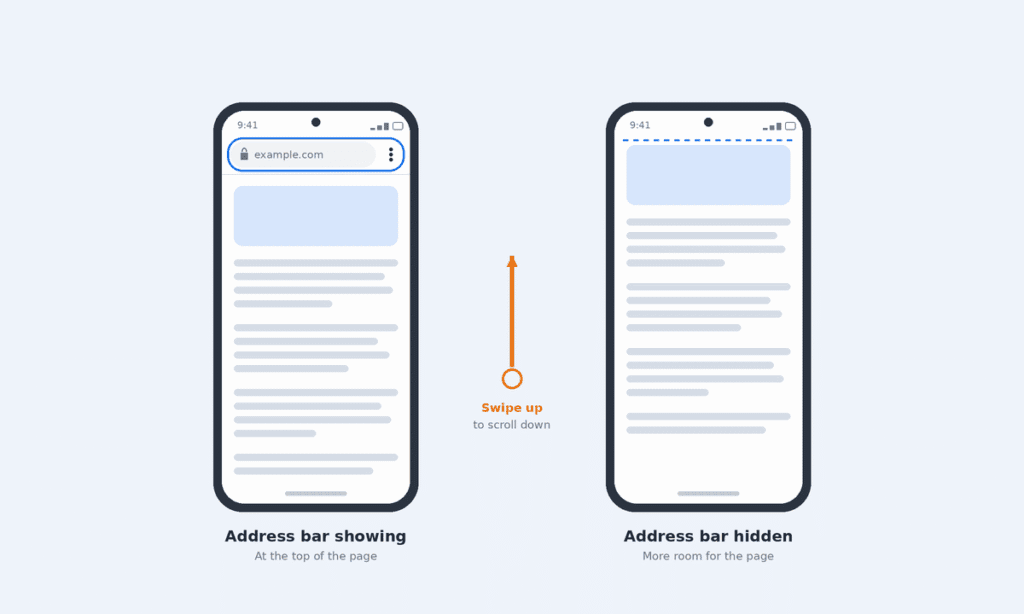
- Open a web page in Chrome.
- Swipe up to scroll down the page. The address bar slides out of view.
- Swipe down slightly, or scroll back to the top, to bring the address bar back.
The Android status bar (clock, battery) and navigation bar usually stay visible. Some pages keep the toolbar showing, for example short pages that don’t scroll.
Method 2: Watch videos in full screen
Many websites let videos fill most or all of your screen using the player’s full-screen button. The exact result depends on the video player and your device.
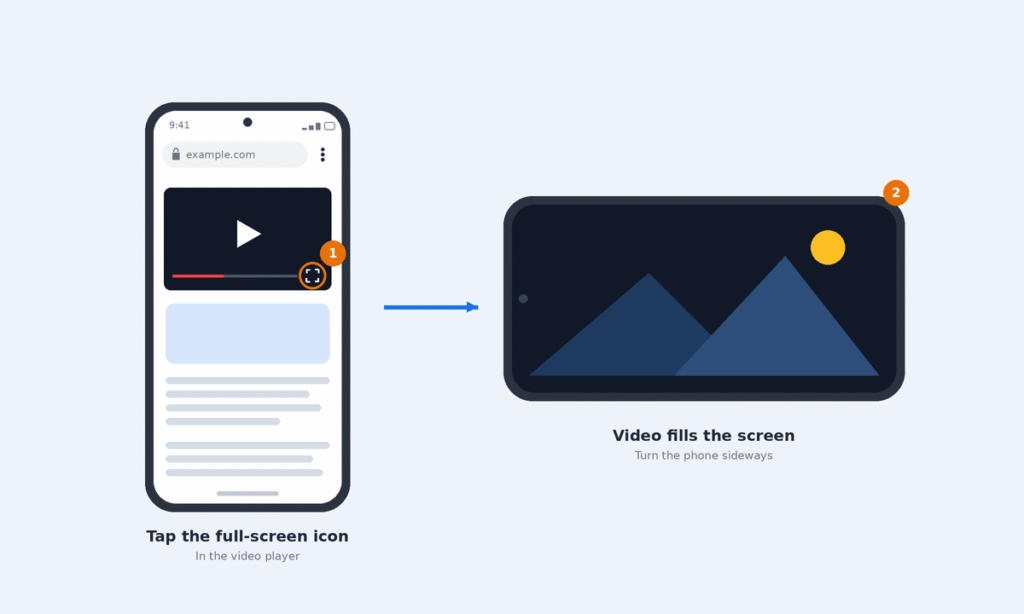
- Start the video on the web page.
- Tap the full-screen icon in the player, usually a square or four corners at the bottom right.
- Turn your phone sideways for landscape viewing if auto-rotate is on.
- To exit, tap the same icon again or use your phone’s Back gesture or button.
This depends on the website. Most major video sites support it, but a site that doesn’t offer a full-screen button can’t be forced into it.
Method 3: Install a site as a web app
If you use one site often, installing it can remove Chrome’s address bar for that site entirely.
- Open the site in Chrome.
- Tap the three-dot menu at the top right.
- If you see Install app, tap it and follow the prompts.
- Open the site from its new home-screen icon.
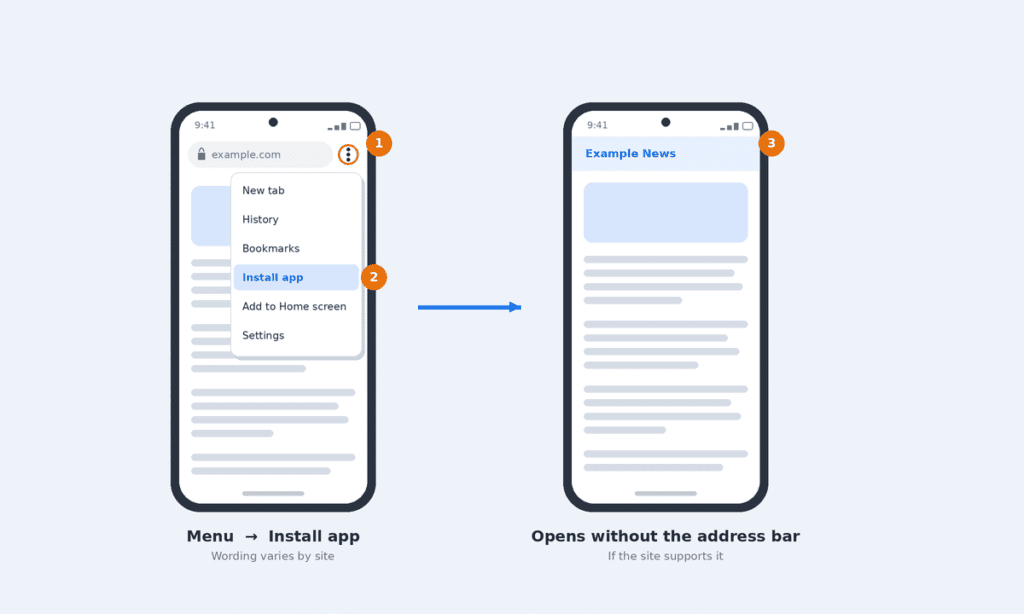
Depending on your Chrome version and the website, the menu may say Install app, Install, Add to Home screen or Create shortcut. Only a web app the site has set to open in its own window, a standalone display mode, removes the address bar. A plain shortcut normally opens in Chrome with the address bar still visible, so it won’t give you full-screen browsing.
Method 4: Check your phone’s display settings
Some phones let you control how much of the screen each app uses. These are phone settings, not Chrome settings, and they don’t hide Chrome’s address bar. They help when Chrome shows black bars, for example on a foldable or tablet, or leaves a gap around the camera.
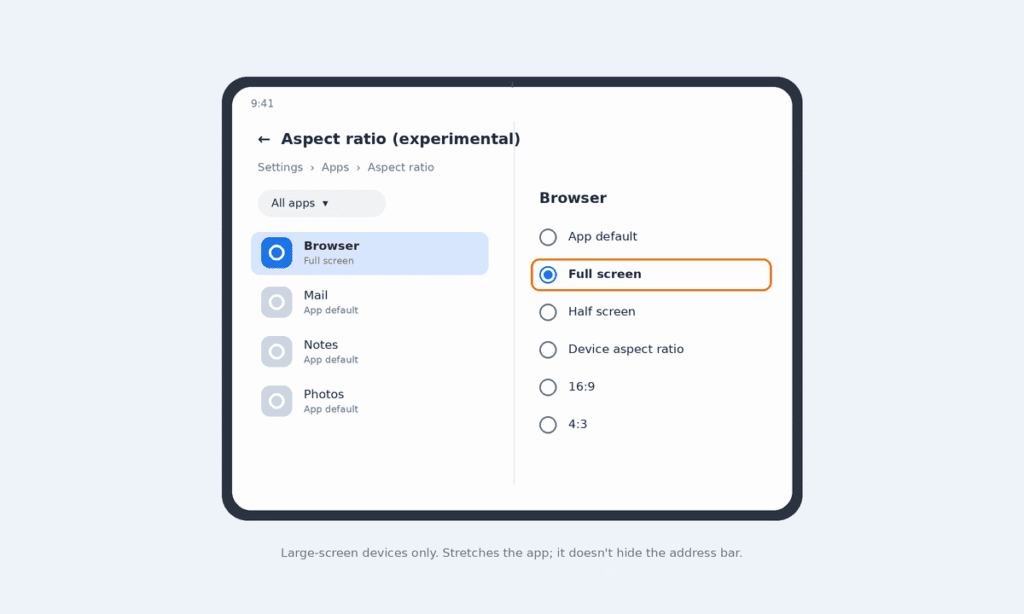
Pixel Fold: Google provides an experimental aspect ratio setting that lets supported apps fill the screen. Go to Settings > Apps > Aspect ratio (experimental), switch Suggested apps to All apps, choose Chrome if it’s listed, and select Full screen. The app restarts to apply it. This stretches Chrome to fill the display; it doesn’t hide the address bar. Other foldables and tablets may have similar controls, so check their settings separately.
Samsung Galaxy: One UI has offered per-app full-screen and camera-cutout controls under Settings > Display. The menu name has changed between versions (Full screen apps, Camera cutout), and Samsung users have reported it moving or changing after One UI 7 and 8 updates. Search Settings for cutout or full screen to find it.
Other brands: Search your Settings app for full screen, aspect ratio or cutout. If you can’t find a matching option, your phone may not support per-app full-screen controls, or the setting may have a different name.
Method 5: Use Page Zoom if you want bigger content
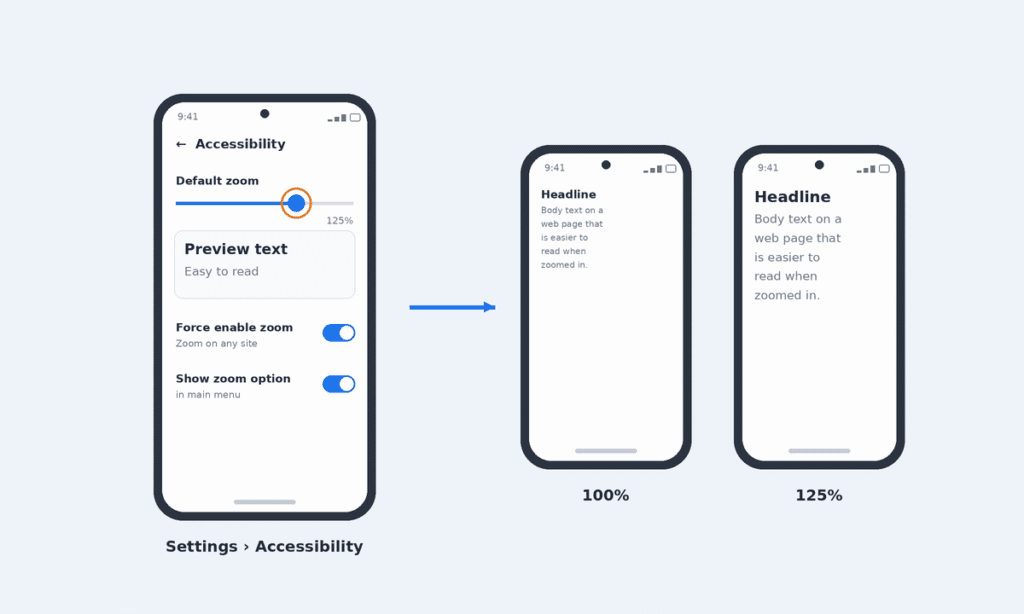
Page Zoom doesn’t make Chrome full screen. It makes text, images and videos on the page larger, which is often what people actually want. Google documents these steps in its Chrome zoom help page.
Set a default zoom for all sites:
- In Chrome, tap the three-dot menu, then Settings > Accessibility.
- Move the Default zoom slider until the preview text is comfortable to read.
- If some pages won’t let you pinch to zoom, turn on Force enable zoom.
Zoom one site only:
- In Settings > Accessibility, turn on Show zoom option in main menu.
- On the site, tap the three-dot menu, then Zoom, and use the slider. Chrome remembers the level for that site.
Why Chrome won’t go full screen on your phone
| Problem | Likely cause | What to try |
|---|---|---|
| Address bar never hides | Page is too short to scroll, or the site pins the toolbar | Try a longer page; nothing to change in settings |
| No full-screen button on a video | Some embedded players don’t offer or allow full screen | Open the video on its original hosting site or official app, if available |
| Installed site still shows the address bar | The site isn’t built as an installable web app | Use Method 1 instead |
| Black bars around Chrome | Phone display setting for Chrome | Check Method 4 for your phone brand |
| Can’t find a “Full screen” option in Recent Apps | That option isn’t part of Chrome and most phones don’t have it | Use the methods above |
Keep Chrome updated from the Play Store, since menu names and features change between versions.
Using Chrome on a computer instead?
Desktop Chrome does have a true full-screen mode. On Windows, press F11. On a Mac, press Control + Command + F, or click the green button at the top left of the window. Press the same keys again to exit.
Frequently asked questions
Is there an F11 equivalent in Chrome for Android?
No. Scrolling hides the address bar on many pages, and videos can go full screen, but there’s no single toggle for all browsing.
Can I make Chrome permanently full screen on Android?
Not for ordinary browsing. The closest options are installing a frequently used site as a web app (Method 3) or a phone-level display setting if your device has one (Method 4).
Does zooming make Chrome full screen?
No. Page Zoom enlarges page content but leaves Chrome’s toolbar and the phone’s status bar in place.
Do Chrome flags enable full screen?
There’s no reliable, supported flag for this. Flags are experimental and can disappear in any update, so we don’t recommend relying on them.

Louis Mugan is a seasoned technology writer with a talent for turning complicated ideas into clear, practical guidance. He focuses on helping everyday readers stay confident in a world where tech moves fast. His style is approachable, steady, and built on real understanding.
He has spent years writing for platforms like EasyTechLife, where he covers gadgets, software, digital trends, and everyday tech solutions. His articles focus on clarity, real-world usefulness, and helping people understand how technology actually fits into their lives.
Outside of his regular columns, Louis explores emerging tools, reviews products, and experiments with new tech so his readers don’t have to. His steady, friendly approach has made him a reliable voice for anyone trying to keep up with modern technology. get in touch at louismugan@gmail.com