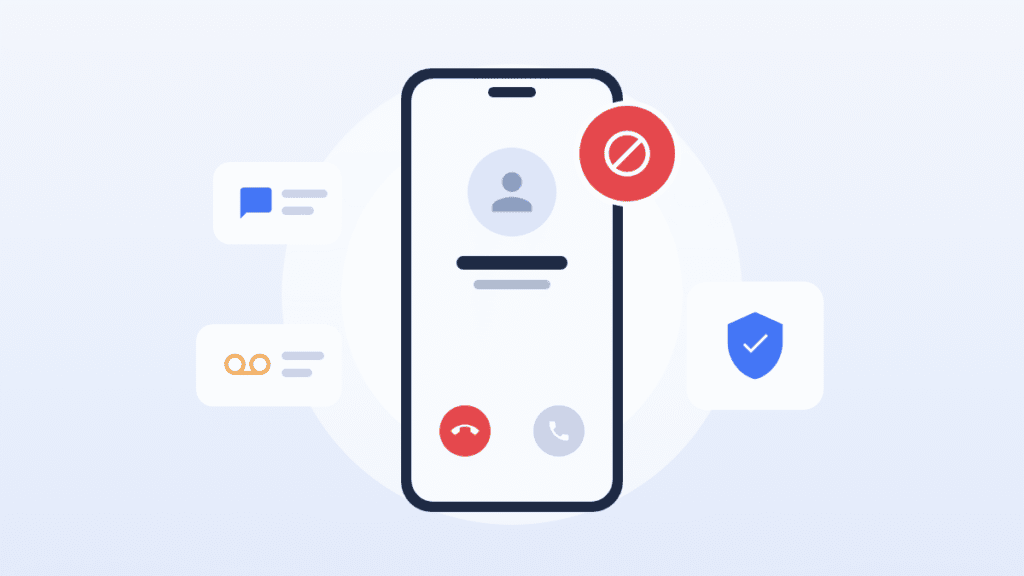
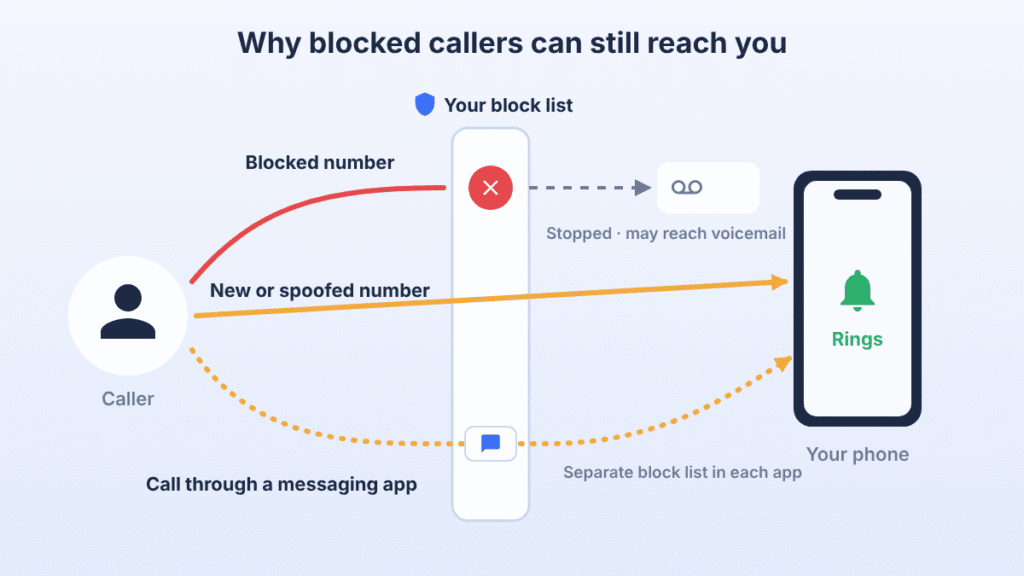
Blocking a number normally stops calls from that number from ringing on your phone. The caller may still reach your voicemail, switch to another number, or contact you through an app like WhatsApp.
So when a blocked caller seems to get through, one of four things is usually happening: they’re using a different number, the incoming call didn’t match your block list, the call reached voicemail without ringing, or they contacted you through a channel your phone’s block list doesn’t cover. Below, you’ll find how to tell which one it is and how to fix it on iPhone and Android.
Why blocked numbers may still appear or contact you
The caller is using a different number
A block applies to one number. Telemarketers rotate through many numbers, and a determined person can switch to a second phone, a work line or a free internet calling number. Each new number has to be blocked separately.
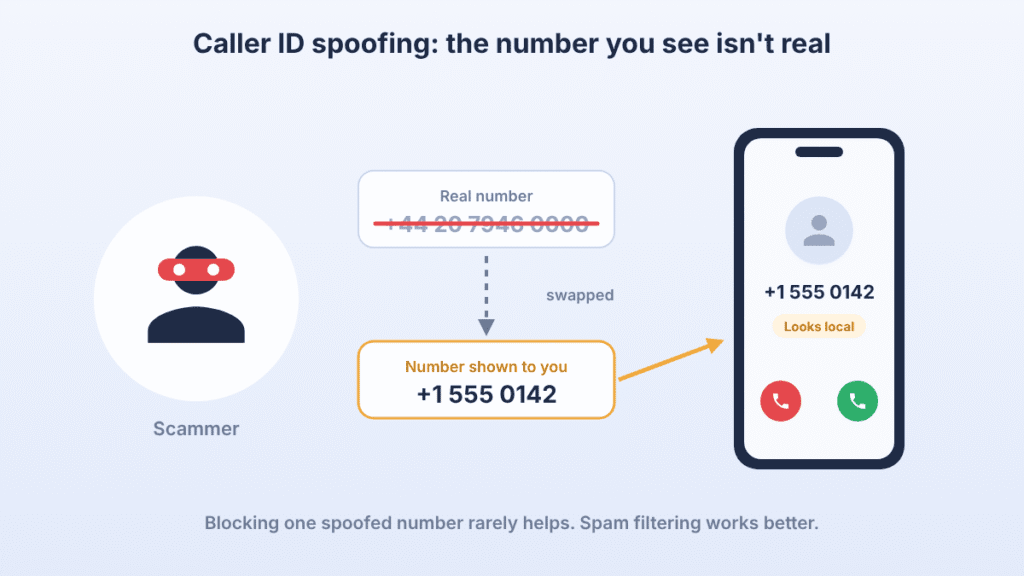
Caller ID spoofing
Spoofing means the caller fakes the number that appears on your screen. Scam calls often show a number close to yours, with the same area code and first digits. Because the displayed number changes, a block on one spoofed number does little. Spam filtering, covered below, handles this better than manual blocking.
The call went to voicemail without ringing
A blocked call can still show up as a voicemail or as an entry in a filtered list. That doesn’t mean your phone rang or that the block failed. See the voicemail section below for where these messages go.
The incoming call doesn’t match the blocked entry
Occasionally the number on an incoming call doesn’t match the entry on your block list. Things to check:
- You typed the number by hand in a different format from how it arrives, such as with or without the country code. Most phones handle this automatically, but blocking again from your call history rules it out.
- You blocked one number from your call history, but the person has another. On iPhone, blocking a saved contact blocks every number on that contact. On Android, check that each number is listed.
- The caller hides their number. Calls showing as “No Caller ID,” “Private” or “Unknown” can’t be blocked by number. You need the unknown-caller setting instead.
The caller is using an app
Your phone’s block list covers regular calls and texts. WhatsApp, Telegram, Messenger, Signal and similar apps have their own block lists. If the calls come through one of these apps, block the person inside that app too. On iPhone, FaceTime and iMessage do follow the phone’s block list.
How to stop calls from blocked numbers on iPhone
These steps are for iOS 26. On iOS 18 and earlier, the blocked list is under Settings > Apps > Phone > Blocked Contacts (or Settings > Phone on older versions).
Check that the number is really blocked
- Open Settings and tap Privacy & Security.
- Tap Blocked Contacts.
- Find the number. If it isn’t there, tap Add Blocked Contact and enter it.
- If the caller uses more than one number, check that you’ve blocked the right contact or added the other numbers to your blocked list.
Block a number straight from your call history
- Open the Phone app and go to your recent calls.
- Tap the info button next to the number.
- Scroll down and tap Block Contact, then confirm.
Blocking applies to every Apple device signed in to the same Apple Account. If your iPad or Mac still rings, check that it’s signed in to the same account and fully updated. The blocked caller isn’t notified that they’ve been blocked.
If a number on your list keeps ringing through, restart the iPhone and install any pending iOS update. If it still rings, remove the number and block it again from your call history, which uses the exact format the network delivers.
Apple’s official guide: Block phone numbers, contacts and emails on your iPhone or iPad.
How to stop calls from blocked numbers on Android
Android menus depend on which Phone app your phone uses. Most phones use either Google’s Phone app (Pixel and many others) or Samsung’s.
Google Phone app
- Open the Phone app.
- Tap More (three dots), then Settings.
- Tap Blocked numbers.
- Check that the unwanted number is listed. If not, tap Add a number and enter it.
To block from your call history instead, tap the call in your recent calls and choose Block / report spam.
Google’s official guide: Block or unblock a phone number.
Samsung Galaxy
- Open the Phone app.
- Tap More options (three dots), then Settings.
- Tap Block numbers.
- Check the list, or tap the + icon to add a number.
On other brands, look for a similar Blocked numbers option in the Phone app’s settings. If a third-party caller ID or blocking app is installed, check its settings too, because it may override the built-in block list.
Samsung’s official guide: How to block numbers on your Galaxy phone.
How to block unknown and spam calls
“Unknown caller” means different things on different phones, and the difference decides whether a setting will help you.
On iPhone (iOS 26), go to Settings > Apps > Phone > Screen Unknown Callers. You can choose:
- Ask Reason for Calling: your iPhone answers calls from numbers not in your contacts and asks the caller why they’re calling before it rings you.
- Silence: calls from numbers not in your contacts go straight to voicemail without ringing.
In the same menu, Call Filtering can move calls from unknown numbers and suspected spam into separate lists, so they don’t clutter your recent calls. Screening options and availability can vary with your iOS version, region and carrier.
On Android, the Unknown setting (Google Phone) and Block unknown/private numbers (Samsung) only block callers who hide their number. Calls from regular numbers that aren’t in your contacts still ring. For those, turn on caller ID and spam protection in the Phone app’s settings.
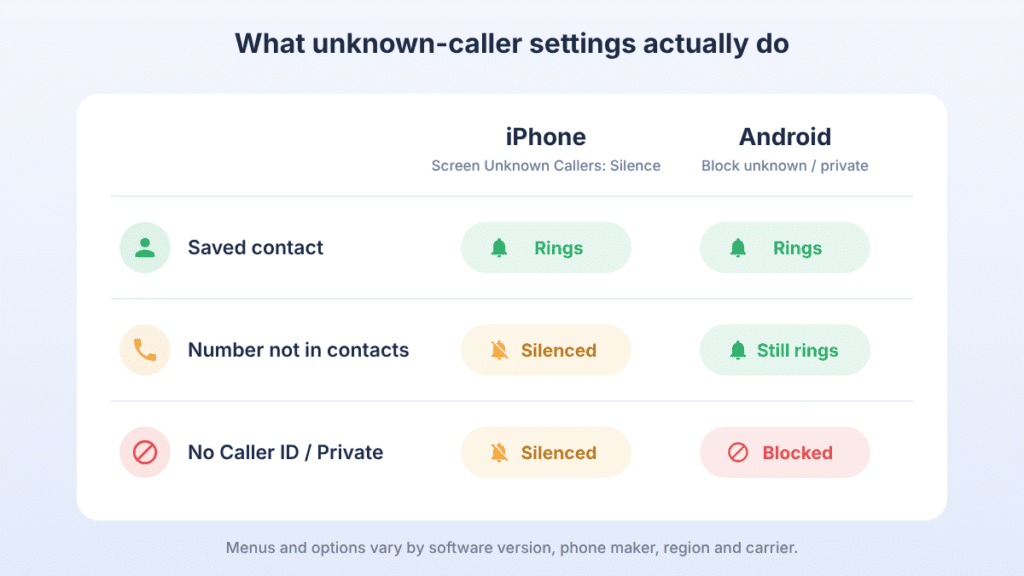
The tradeoff: silencing everyone outside your contacts also silences doctors, delivery drivers, schools and job interviewers. If you turn it on, check your voicemail or filtered calls regularly, and save important numbers as contacts.
Most carriers also offer free spam filtering, either built into the network or through their own app. Your carrier’s website will list what’s available on your plan.
Blocked callers and voicemail
Whether a blocked caller can leave a voicemail depends on your phone and your carrier. Finding one doesn’t mean the block failed.
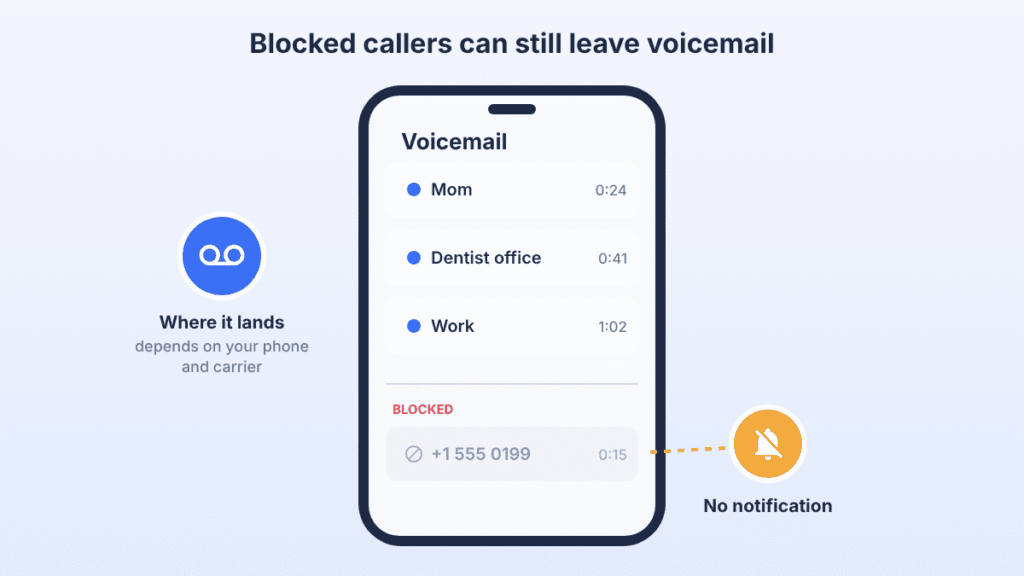
- iPhone: a blocked caller can usually still leave a voicemail, but you won’t get a notification. Depending on your voicemail setup and carrier, you may find these messages in a Blocked Messages section at the bottom of your voicemail list or in your carrier’s voicemail service. You can’t stop them from the phone itself.
- Google Phone app: if visual voicemail is turned on, blocked callers can’t leave voicemails. Calls from a blocked number also won’t appear in your call history.
- Other Android phones and basic voicemail: your carrier’s voicemail system answers the call, so a blocked caller may still be able to leave a message.
If blocked callers keep filling your voicemail, ask your carrier whether it offers network-level blocking that rejects calls before they reach voicemail. Availability and behavior vary by carrier.
Quick troubleshooting
| What you’re seeing | Likely cause | What to do |
|---|---|---|
| Your phone rings from a number you blocked | The call doesn’t match the blocked entry, or a software glitch | Re-block it from your call history; restart and update the phone |
| The same person keeps calling from new numbers | They’re switching numbers | Block each new number; for harassment, see the next section |
| Spam calls from numbers that look like yours | Caller ID spoofing | Turn on spam filtering on your phone and with your carrier |
| Calls show as Private or No Caller ID | The caller is hiding their number | Turn on the unknown/private caller setting |
| A blocked caller left a voicemail | Normal voicemail behavior on many phones and carriers | Check your voicemail’s blocked section (iPhone) or ask your carrier about network blocking |
| Calls appear in your list but your phone didn’t ring | Silence or screening of unknown callers is on | Review Screen Unknown Callers or Call Filtering settings |
| The person reaches you on WhatsApp or another app | App calls bypass the phone’s block list | Block them inside each app |
| Your iPad or Mac rings for a blocked number | Device on a different Apple Account or not updated | Sign in to the same account and update all devices |
If you’re being harassed
If someone you know, such as an ex-partner, keeps contacting you after being blocked, blocking alone usually isn’t enough. Persistent unwanted contact is a crime in many places.
- Keep evidence. Don’t delete voicemails, texts or call logs. Take screenshots that show dates, times and numbers. Voicemails left after a block can be useful evidence.
- Contact your carrier. Many carriers have a harassment or nuisance-call team that can trace calls, block numbers on the network or change your number.
- Report it. If the contact is threatening or won’t stop, contact the police. Bring your evidence. In many countries you can also ask a court for a protection order.
- Get support. A domestic violence or victim-support helpline in your country can help you plan your next steps safely.
If you’re in immediate danger, call your local emergency number.
Frequently asked questions
Does a blocked caller know they’re blocked?
No. Neither iPhone nor Android tells them directly. They may notice that their calls always go to voicemail or that their texts are never answered.
Can a blocked number still text me?
Not through regular SMS or iMessage. Apps like WhatsApp have separate block lists, so block the person there too.
Will I see calls from a blocked number in my call history?
Usually not. On Google’s Phone app, calls from blocked numbers don’t appear in your history at all.
Why does a blocked number still show up in my voicemail?
On many phones and carriers, voicemail still answers blocked calls. On iPhone, you won’t get a notification. Depending on your setup, the messages may be in a Blocked Messages section of your voicemail list or in your carrier’s voicemail service.
Can I block a private or No Caller ID number?
Not by number, since there’s no number to block. Turn on the unknown or private caller setting in your Phone app instead.
How do I unblock a number?
Open the same blocked list described above and remove the number. Only do this if you want calls from that number again.

Louis Mugan is a seasoned technology writer with a talent for turning complicated ideas into clear, practical guidance. He focuses on helping everyday readers stay confident in a world where tech moves fast. His style is approachable, steady, and built on real understanding.
He has spent years writing for platforms like EasyTechLife, where he covers gadgets, software, digital trends, and everyday tech solutions. His articles focus on clarity, real-world usefulness, and helping people understand how technology actually fits into their lives.
Outside of his regular columns, Louis explores emerging tools, reviews products, and experiments with new tech so his readers don’t have to. His steady, friendly approach has made him a reliable voice for anyone trying to keep up with modern technology. get in touch at louismugan@gmail.com