Outlook remembers the addresses you send to and suggests them as you type in the To field. That’s handy until someone changes their address or you mistype one, and the wrong suggestion keeps popping up.
You can usually remove it without deleting the contact or touching your email account. Which method works depends on your Outlook version and, since 2026, on the type of account you use.
The quick answer
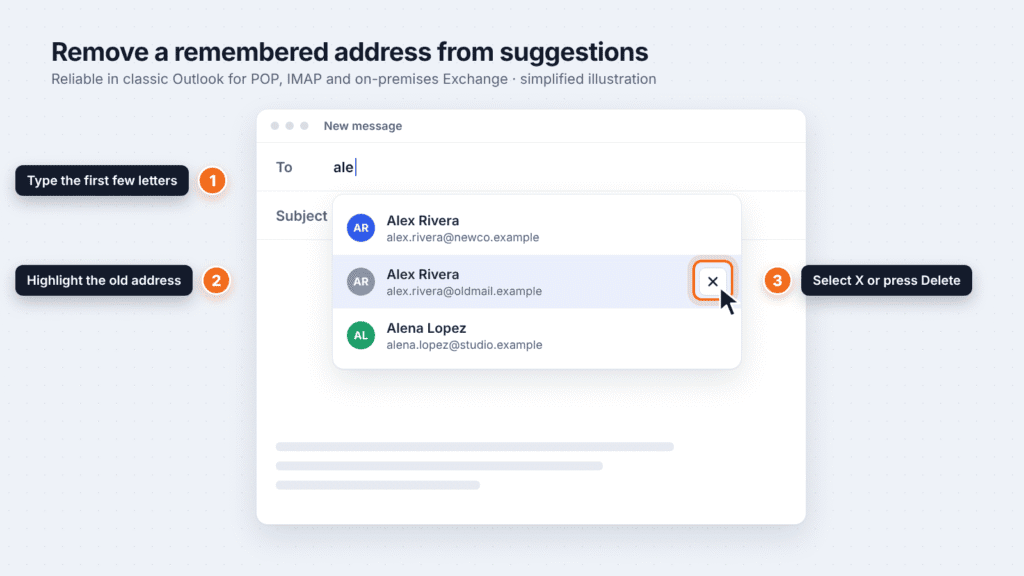
- Start a new email and type the first few letters of the unwanted address in the To field.
- When the suggestion appears, point to it or move to it with the arrow keys. Don’t click it.
- Select the X next to it, or press Delete.
If there’s no X, or the address comes back later, your suggestions probably come from Microsoft 365 rather than Outlook’s own list. Jump to the section on addresses that keep coming back.
Microsoft is still changing how this works. The steps below were checked against Microsoft’s documentation in October 2026.
Check your account type first
Your account type decides whether removing a single suggestion actually sticks. Around March 31, 2026, Microsoft retired the feature behind the X button. It brought the X back in classic Outlook for Windows around June 1, 2026, but not every account got the old behavior back (Microsoft known issue).
| Your account | Where suggestions come from | Does removing one suggestion stick? |
|---|---|---|
| Work or school Microsoft 365 account (Exchange Online) | Microsoft Search | No. The X may look like it works, but Microsoft says the address will come back after further use. Reset your suggested contacts instead. |
| Company email on an on-premises Exchange server | Outlook’s Auto-Complete list | Generally yes, in classic Outlook |
| Gmail, Yahoo or another account added to classic Outlook as POP or IMAP | Outlook’s Auto-Complete list | Generally yes, in classic Outlook |
| Personal Outlook.com or Hotmail account | Your Microsoft account’s people suggestions | It varies. If there’s no X or the address returns, reset suggestions instead. |
Not sure which you have? In classic Outlook, go to File > Account Settings > Account Settings and check the Type column. A work or school address that you also sign in to at outlook.office.com is almost always Exchange Online. Your IT team can confirm it.
Remove one suggestion in classic Outlook for Windows
This works reliably for POP, IMAP and on-premises Exchange accounts. On a Microsoft 365 work or school account, the address may come back.
- Select New Email.
- In the To field, type the first few letters of the address you want to remove.
- Point to the suggestion until it’s highlighted, or move to it with the arrow keys. Don’t click it.
- Select the X next to it, or press Delete.
- Close the draft without sending it.
This removes the address from suggestions only. The contact card and your emails stay where they are. If you email that address again later, Outlook adds it back to the list (Microsoft Learn).
Clear the whole Auto-Complete list in classic Outlook
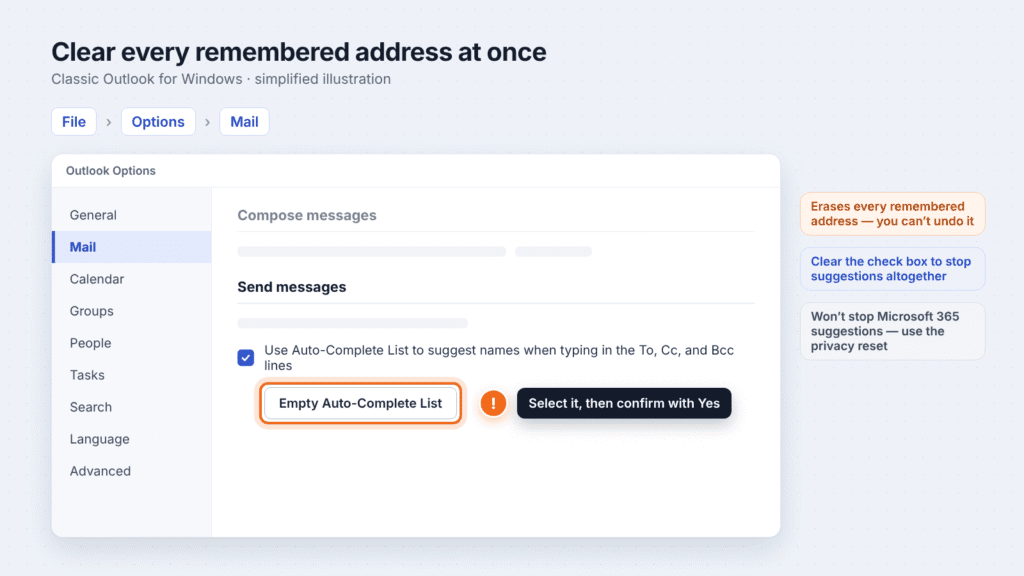
Use this when many old addresses clutter your suggestions. It erases every remembered address at once, and you can’t undo it. Save any addresses you want to keep as contacts first.
- Select File > Options.
- Select Mail.
- Under Send messages, select Empty Auto-Complete List.
- Select Yes to confirm.
You can also close Outlook, press Windows key + R, type outlook.exe /CleanAutoCompleteCache and press Enter. Outlook opens with an empty list.
To stop suggestions altogether, clear the Use Auto-Complete List to suggest names when typing in the To, Cc, and Bcc lines check box in the same section.
On a Microsoft 365 work or school account, neither method stops the returning suggestions. Microsoft says clearing the cache or switching the feature off and on doesn’t affect them. Use the account reset further down instead.
New Outlook for Windows and Outlook on the web
These versions may not let you remove a single suggestion, depending on your account. Since Microsoft retired the feature in 2026, many users on Microsoft’s support forum report that the X is gone. If you still see an X, select it. If not, reset your suggestions from your account’s privacy settings, covered in the section on addresses that keep coming back.
Some accounts also show a shortcut inside Outlook. Microsoft support staff have pointed users to it, but it isn’t in Microsoft’s main documentation, so it may not appear for you:
- Select Settings (the gear icon) > General > Privacy and data.
- Under Suggested people, select Clear data and turn off.
Either route leaves your saved contacts and your company directory in place.
Whether a removal carries over depends on your account. Classic Outlook keeps its own Auto-Complete list for POP, IMAP and on-premises Exchange accounts, and Outlook on the web doesn’t share it. Microsoft 365 suggestions are shared across Outlook and other Microsoft apps, so an address removed in one place can reappear while Microsoft Search still suggests it.
Outlook for Mac
Microsoft’s Mac guide uses the same X as the other versions:
- Select New Email.
- In the To field, type the first few letters of the address.
- When the suggestion appears, select the X to the right of the name.
That guide predates the 2026 change, and Microsoft’s known issue also covers Outlook for Microsoft 365 for Mac. If the X is missing, or a work or school address comes back, use the account reset below.
Outlook app for iPhone and Android
Microsoft’s mobile guide describes hiding a suggestion while you address an email:
- Android: type the name in the To field, then tap the X next to the suggestion.
- iPhone: type the name, then swipe left on the suggestion.
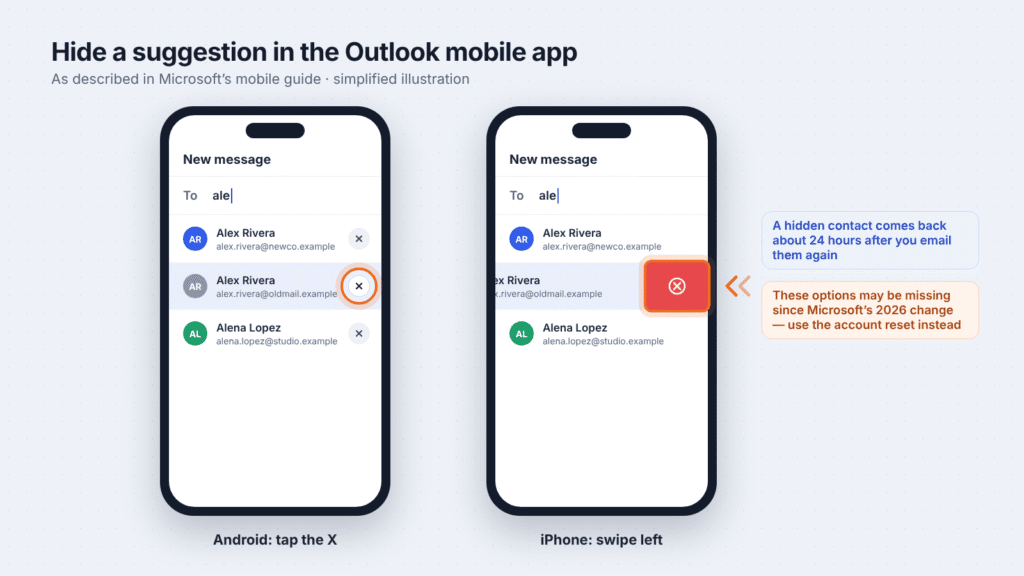
That guide predates the 2026 change, so these options may be missing on your phone. If they are, reset your suggestions from your account’s privacy settings, as described below. That reset applies to Outlook on every device, including your phone.
If the address keeps coming back
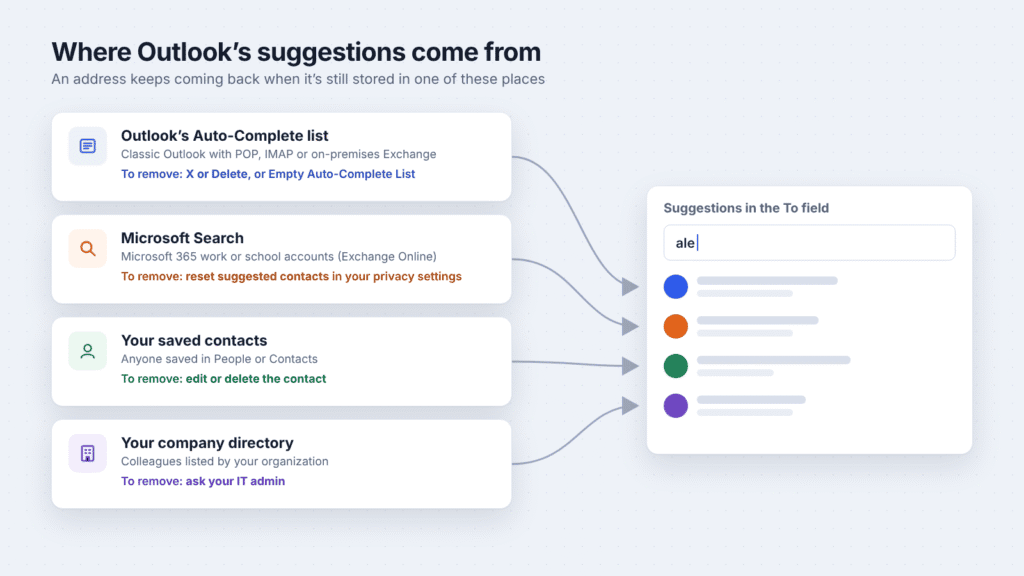
A returning address is still stored somewhere Outlook draws suggestions from. If you’ve already removed it from the Auto-Complete list, check the other three places in this order.
1. Reset suggested contacts for your account
This is Microsoft’s own fix for Microsoft 365 suggestions that won’t go away. The setting covers Outlook on Windows, Mac, the web and mobile, plus Teams and other Microsoft apps.
Before you reset: this clears suggested-contact history across Microsoft apps, including Outlook and Teams, and you can’t get it back. Saved contacts and company-directory entries will still appear in suggestions.
Work or school account:
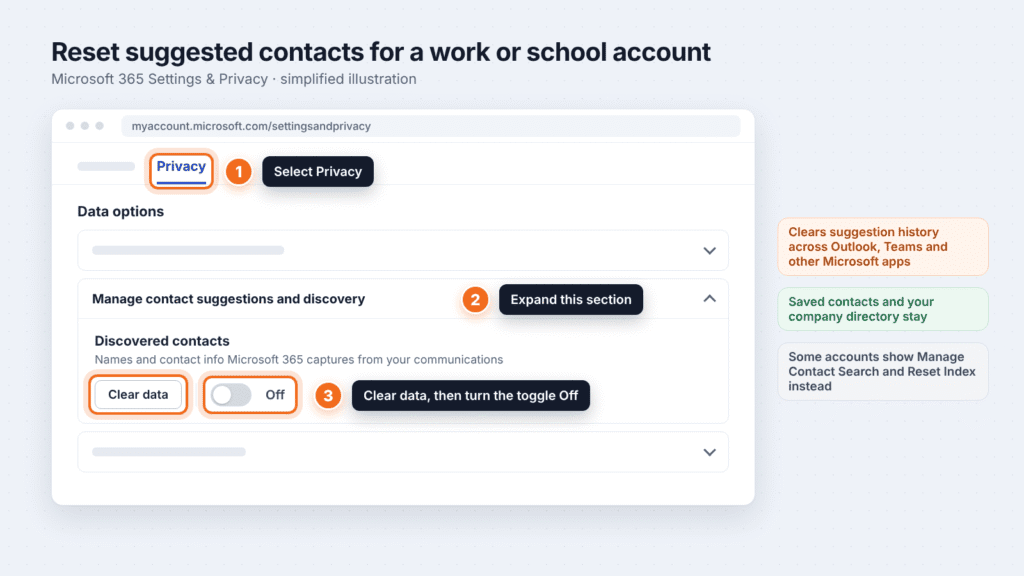
- Go to Settings & Privacy and sign in with your work or school account.
- Select the Privacy tab.
- Under Data options, expand Manage contact suggestions and discovery.
- Under Discovered contacts, select Clear data to remove the suggestion data already collected.
- To stop collecting new suggestions from your emails, turn the Discovered contacts toggle Off.
Some accounts still show older labels: Manage Contact Search, with Reset Index in place of Clear data.
Personal Microsoft account (Outlook.com or Hotmail):
- Open your Microsoft account Privacy page and sign in.
- Find the people suggestions setting. Microsoft’s support pages call it Expanded people suggestions. On some accounts it appears as People suggestions under Empower your productivity.
- Turn it Off. Microsoft says this also clears your expanded people data, so old suggestions are removed, not just hidden.
Changes may not show up right away.
2. Delete or edit the saved contact
Outlook keeps suggesting anyone saved in your contacts. Open People (or Contacts), search for the old address, then edit or delete it.
3. Ask IT about the company directory
If the address belongs to someone in your organization’s directory, only your IT admin can change or remove it.
Suggestion, contact or email account: which do you want to remove?
These are three different things, and each is removed a different way.
| What you want to remove | What it is | How to remove it |
|---|---|---|
| A suggested address | An address Outlook remembers from emails you’ve sent | The steps in this guide |
| A saved contact | A contact card saved in People | Delete or edit it in People |
| An email account in Outlook | One of your own mailboxes connected to the app | Classic Outlook: File > Account Settings > Account Settings, select the account, then Remove |
Removing an account only disconnects that mailbox from Outlook. It doesn’t fix unwanted suggestions, so don’t use it for that.
Frequently asked questions
Does removing a suggestion delete the contact?
No. It only takes the address out of the suggestion list. Saved contacts stay until you delete them in People.
Why did the X disappear in Outlook?
Microsoft retired the feature that removed single suggestions around March 31, 2026. The X returned in classic Outlook for Windows around June 1, 2026. On Microsoft 365 work and school accounts, removed addresses can still come back.
Will the address come back if I email that person again?
Yes. Sending a new message to the address adds it back to your suggestions.
Can I get addresses back after emptying the Auto-Complete list?
No. Save any addresses you want to keep as contacts before you empty the list.
Does resetting suggested contacts affect other Microsoft apps?
Yes. The privacy setting applies wherever your account is used, including Outlook on every device, Teams and Windows Search.

Louis Mugan is a seasoned technology writer with a talent for turning complicated ideas into clear, practical guidance. He focuses on helping everyday readers stay confident in a world where tech moves fast. His style is approachable, steady, and built on real understanding.
He has spent years writing for platforms like EasyTechLife, where he covers gadgets, software, digital trends, and everyday tech solutions. His articles focus on clarity, real-world usefulness, and helping people understand how technology actually fits into their lives.
Outside of his regular columns, Louis explores emerging tools, reviews products, and experiments with new tech so his readers don’t have to. His steady, friendly approach has made him a reliable voice for anyone trying to keep up with modern technology. get in touch at louismugan@gmail.com