Yes, you can watch full-length movies on YouTube for free, legally. YouTube has its own catalog of ad-supported movies from studios and distributors, and you don’t need a subscription to watch them. You just sit through some ads. This guide shows where to find them on a computer, phone or TV, how to tell a legal upload from a pirated one, and what to do when free movies don’t show up.
Quick answer: Go to youtube.com/movies or open Movies & TV in YouTube’s menu, then choose Free with ads. Pick a movie and press play. YouTube’s official free movie catalog is available in the US, Australia, Japan, Germany and the UK, and the titles change regularly.
How to watch free movies on YouTube
On a computer
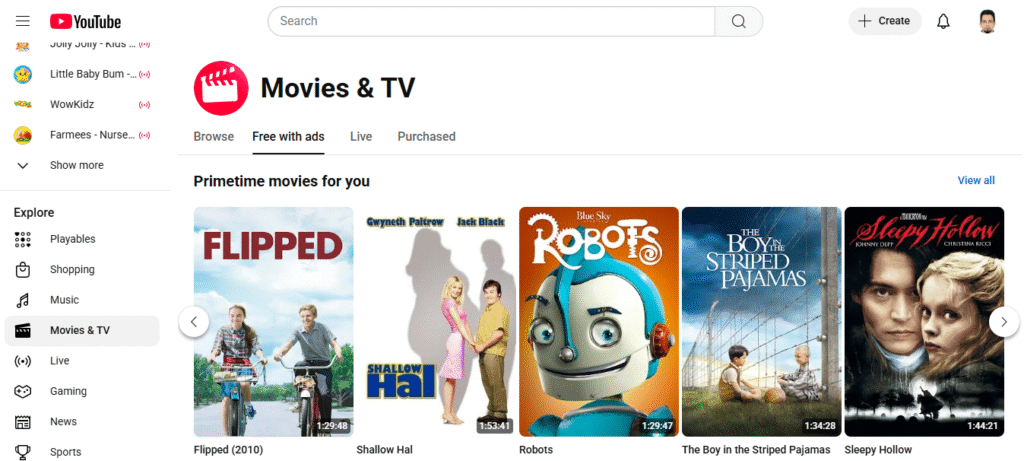
- Go to youtube.com/movies, or open YouTube, click the menu icon (three lines) at the top left and select Movies & TV under Explore.
- Select the Free with ads tab.
- Browse the rows by genre, or click View all next to a row to see more.
- Click a movie and press play.
In the YouTube app on a phone or tablet
- Open the YouTube app and make sure it’s up to date.
- Find Movies & TV. Depending on your app version, it’s in the Explore menu or in the topic list at the top of the Home tab.
- Tap Free with ads, then pick a movie.
If you can’t find Movies & TV in the app, open youtube.com/movies in your phone’s browser. You can also search YouTube for a specific movie, but check whether the result is marked Free with ads before you choose it. Menu locations and available titles vary by device and region.
On a smart TV or streaming device
Open the YouTube app on your smart TV, Roku, Fire TV, Apple TV, Google TV or game console. Look for Movies & TV or a free-movie row on the Home screen. If neither appears, search for a specific title and check whether YouTube offers it Free with ads. The catalog and menu layout vary by device and country.
The “free movies for you” shelf
YouTube also shows a row of free movies on the Home page, which it calls a free movies for you shelf. It highlights a selection of titles and doesn’t necessarily show every movie, so use youtube.com/movies when you want to browse the full catalog.
How YouTube’s free movies work
YouTube calls its program Free Primetime Movies & Shows. Here’s what YouTube says about it:
- They’re free with ads. You don’t pay to rent or buy these titles. Ads play before and during the movie, a bit like watching on broadcast TV.
- Movies are available in five countries: the US, Australia, Japan, Germany and the UK.
- Free TV shows are available in the US and Australia only.
- The catalog changes. Titles are added and removed over time, so a movie that’s free this month may not be next month.
- YouTube Premium or Premium Lite removes the ads. You don’t need either one to watch, though.
Free TV shows on YouTube
In the US and Australia, YouTube also has full TV episodes free with ads. You can browse them at youtube.com/freeshows or in the Free with ads section of Movies & TV. Like the movies, the shows on offer change over time.
Other legal ways to watch free movies on YouTube
Outside the Movies & TV section, some studios and distributors post full movies on their own YouTube channels, usually with ads. You’ll also find older films that are in the public domain, though whether a film is in the public domain depends on the specific film and country.
To find them, search for a title plus “full movie.” After searching, open Filters and look for a duration option such as Over 20 minutes to narrow the results to longer videos. Filter names and options may vary by device. Filters won’t confirm that a video is a full-length or legally uploaded movie, so check its runtime and who posted it before you start watching.
How to tell a legal upload from a pirated one
Not every “full movie” on YouTube is posted by someone who has the rights to it. Before you settle in, check these signs:
- It’s in YouTube’s Movies & TV catalog. Titles marked Free with ads there are licensed by YouTube.
- The channel belongs to a studio or distributor. Look at the channel name, its other videos, its About page and how long it has been around. Words like “full movie” or “HD” in a title, or an official-looking channel name, don’t prove the uploader has the rights.
- Possible warning signs: a recent theatrical release uploaded by an unrelated channel, a cropped or mirrored picture, a misleading title, or links sending you to unfamiliar sites to “watch the full movie.” None of these alone proves an upload is unauthorized.
Unauthorized uploads may be removed without notice, so they aren’t a reliable way to watch a movie. Avoid suspicious links that send you away from YouTube, especially ones that ask for payment details, downloads or personal information.
Free vs. rent vs. buy vs. Primetime Channels
| Option | Cost | What you get |
|---|---|---|
| Free with ads | Free | Ad-supported movies and shows from YouTube’s free catalog. Selection changes regularly. |
| Rent | Pay per movie | Watch a movie for a limited rental period. The exact rental window is shown before checkout. |
| Buy | Pay per movie | The movie stays in your YouTube library, subject to YouTube’s purchase and usage terms. |
| Primetime Channels | Price varies by channel | Streaming services you subscribe to through YouTube. Some offer free trials; check the trial length, billing and cancellation terms before you subscribe. |
| YouTube Premium or Premium Lite | Monthly subscription | Removes ads from YouTube’s free movies and shows. It doesn’t unlock paid rentals or purchases. |
Renting and buying depend on your location, according to YouTube. In the US, YouTube Premium costs $15.99 a month and Premium Lite $8.99 a month after the April 2026 price increase, 9to5Google reported. You don’t need either one to watch free movies.
Why YouTube isn’t showing free movies
- Your country: YouTube’s official free movie program is available in the US, Australia, Japan, Germany and the UK, and its free TV shows in the US and Australia. Other legally uploaded free movies may be available elsewhere, depending on distribution rights.
- Restricted Mode: It hides videos that may be mature, so some movies may not appear or play. See what to do if you can’t turn off Restricted Mode on YouTube.
- A supervised or kids account: Parental settings can limit what you see. If a parent or school manages your account, ask them.
- An outdated app: Update the YouTube app, or try youtube.com/movies in a web browser.
- The movie left the catalog: Free titles rotate. If a movie you saw before is gone, it may only be available to rent or buy now.
If the free section shows up but a single movie won’t play, check your internet connection, try a different browser or device, and if you use an ad blocker, try pausing it to see whether it’s interfering with playback.
Picture quality and internet speed
YouTube adjusts quality to your connection automatically. To change it yourself, select the Settings (gear) icon while the movie plays, then Quality. The resolution available depends on the movie, your device and your connection. YouTube recommends these sustained speeds:
| Quality | Recommended speed |
|---|---|
| 4K | 20 Mbps |
| HD 1080p | 5 Mbps |
| HD 720p | 2.5 Mbps |
YouTube says movies, TV shows and live streams need a connection of at least 1 Mbps.
Frequently asked questions
Is it legal to watch free movies on YouTube?
Yes, when they come from YouTube’s Movies & TV catalog or from a channel that owns or licenses the movie. Be wary of unofficial “full movie” uploads, which may not be authorized and can be removed at any time.
Do I need a YouTube account to watch free movies?
You don’t need a paid YouTube subscription to watch Free with ads movies. Some titles may play without signing in, but age-restricted movies require an eligible signed-in account. Account features such as watch history also require signing in.
Can I watch YouTube’s free movies without ads?
Only with YouTube Premium or Premium Lite. YouTube says titles in its free program play without ads for subscribers to either plan.
Which movies are free on YouTube right now?
The list changes often, so the most reliable place to check is the Free with ads tab at youtube.com/movies. Third-party lists of free YouTube movies can go out of date quickly.
Can I download free movies from YouTube?
Don’t count on it. YouTube doesn’t guarantee offline downloads for titles in its free, ad-supported catalog. Eligible rented or purchased movies can be downloaded for offline viewing in the YouTube app on supported iPhone, iPad and Android devices, according to YouTube Help, and you don’t need YouTube Premium for that. Avoid third-party download tools that get around YouTube’s own download options.
Related: how to get HBO Max and how to fix missing DRM support.
How this guide was put together
This guide was updated in November 2026 using YouTube’s official information about Free Primetime Movies & Shows, Primetime Channels, purchases and downloads, YouTube Help’s internet speed recommendations, and published reporting on YouTube Premium’s 2026 US prices. We also reviewed Google and Bing search results to find common questions. The device steps are based on published guidance, not new hands-on testing. YouTube’s menus and available titles may change.

Louis Mugan writes how-to and troubleshooting guides for EasyTechLife, covering Android phones, iPhones, laptops, Chromebooks, headphones and everyday software.
He aims to base each guide on official manufacturer documentation and support pages, and to link the sources so readers can check the steps for themselves. Questions or corrections? Use the contact page.