
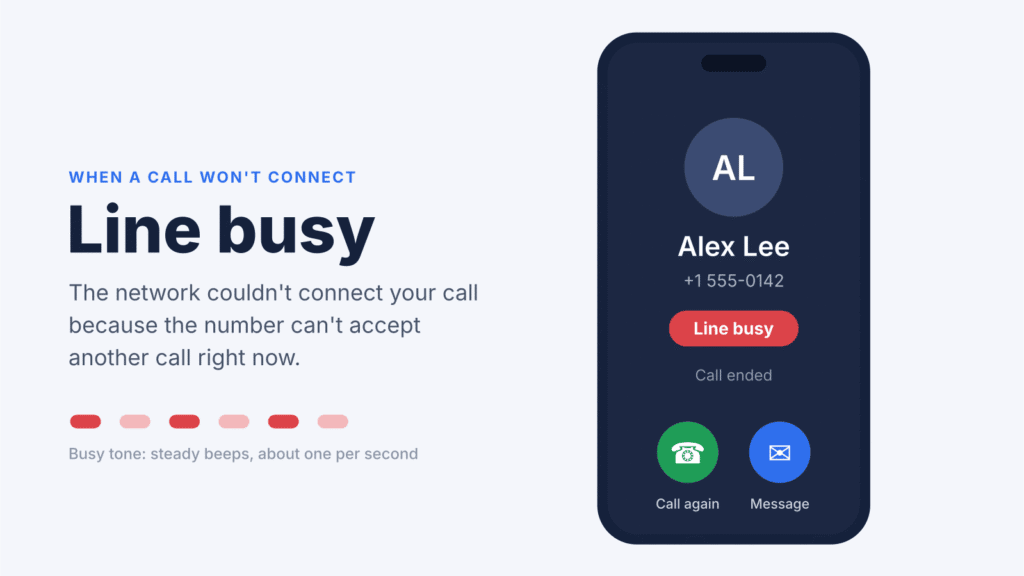
A “Line busy” message or busy signal means your call couldn’t connect because the number you dialed can’t accept another call right now. Most of the time, the other person is simply on a call. But network congestion, call settings, a blocked number, or a problem with your own phone or SIM can produce the same result.
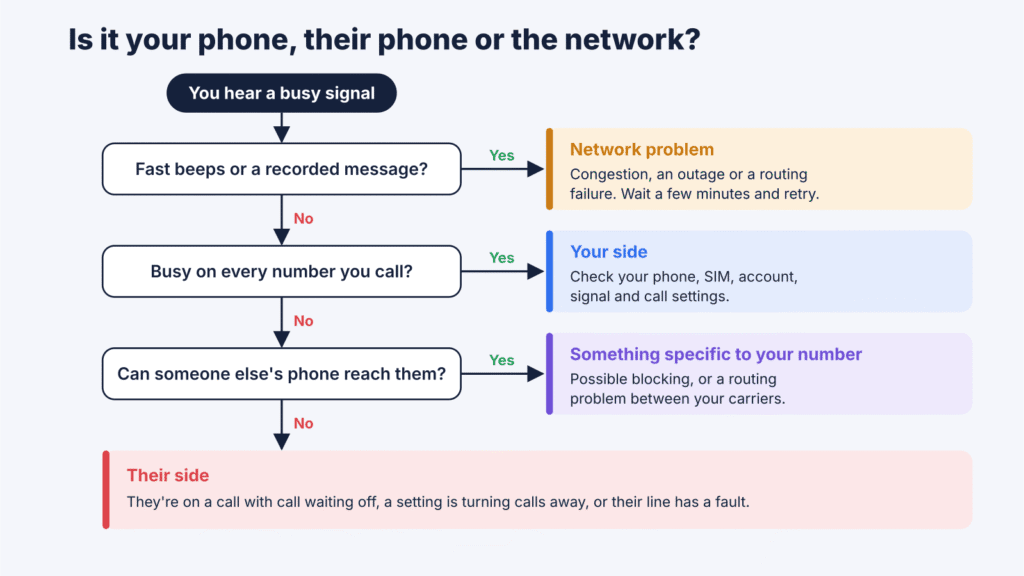
The fastest way to find the cause is to notice the pattern. A busy signal on one number usually points to the other person’s side. A busy signal on every number you call points to yours. This guide explains what each sound means, the eight most common causes, and step-by-step fixes for Android, iPhone and landlines.
What does “line busy” mean when calling someone?
A busy signal, also called a busy tone or engaged tone, is the network telling you the call can’t be completed to that number right now. In North America it sounds like a steady beep about once a second. Tones differ by country, but the meaning is the same.
How often you hear it depends on the type of phone you’re calling:
- Landlines. A basic line carries one call at a time. If the person is already talking and has no call waiting or voicemail, every other caller hears a busy tone. A handset left off the hook keeps the line busy too.
- Mobile phones. Most mobile plans include call waiting and voicemail, so a true busy signal is now less common. If the person is on another call, you’ll usually hear ringing or reach voicemail. A busy tone on a mobile number more often means call waiting is off, the call was rejected, or the network couldn’t route it.
What “Line busy” means on Samsung and other Android phones
Samsung Galaxy phones and some other Android phones show “Line busy” as text on the call screen instead of, or along with, the tone. It means the same thing: the network reported that the number can’t take your call. iPhones usually play the tone or show “Call Failed” when a call doesn’t go through.
If you see “Line busy” on one contact, the cause is usually on their end or between your carriers. If you see it on every call you make, the cause is most likely on yours.
Quick diagnosis: is it your phone, their phone, or the network?
Match what you’re experiencing to the closest row, then jump to the matching section below.
| What you notice | Most likely cause | Try this first |
|---|---|---|
| Busy signal on one number only | They’re on a call with call waiting off, their landline is off the hook, or their phone is rejecting calls | Wait 10 to 15 minutes, then text or message them |
| Busy signal on every number you call | A problem with your phone, SIM, account or local network | Restart your phone and test a second number |
| Busy right away, with no ringing at all | The call was rejected or couldn’t be routed | Check the number and country or area code, then retry |
| One ring, then busy or voicemail | The call was declined, manually or automatically | Try again later; one attempt proves nothing |
| Fast busy signal (beeps about twice a second) | Network congestion or a routing failure | Wait a few minutes and check your carrier’s outage page |
| A recording like “all circuits are busy” | Network congestion | Wait and retry, or send a text |
| Other people hear busy when calling you | Call waiting, call forwarding, call barring or blocking on your phone | Check your incoming-call settings |
| Calls go straight to voicemail | Do Not Disturb, silenced callers, forwarding, or the phone is off | Not a busy signal; review those settings |
Why does a phone say line busy? 8 common causes
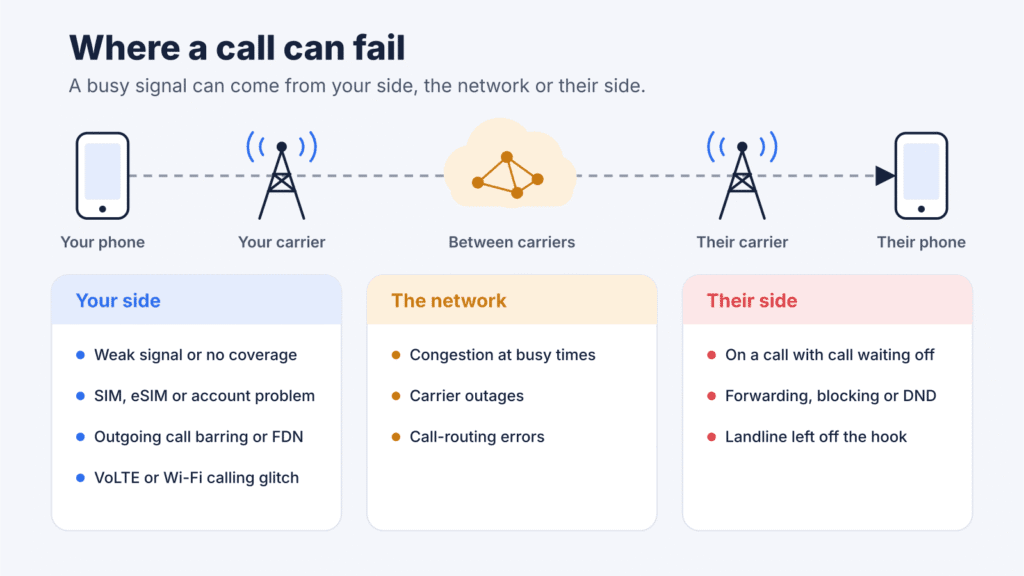
1. The person is already on another call
This is still the most common reason for a busy signal. It also covers the moment they’re dialing out. Whether you hear busy depends on their call settings:
- Call waiting on: you usually hear ringing, and they see your call on their screen.
- Call waiting off: you go to voicemail if they have it. On iPhone, Apple notes that calls go straight to voicemail when call waiting is off. With no voicemail or “forward when busy” rule, you hear a busy tone.
- Dual SIM phones: call waiting may only work on the line that’s in use. A call to their second number can fail while they talk on the first.
2. Network congestion or a carrier problem
Every cell tower and phone exchange can only handle so many calls at once. During concerts, sports events, storms, emergencies and holidays like New Year’s Eve, the network can run out of capacity. You’ll often hear a fast busy signal or a recording such as “all circuits are busy.” A local outage at either carrier can cause the same thing. Nothing on your phone needs fixing; wait and try again, or send a text instead.
3. Your number may be blocked
A busy signal alone does not prove you’ve been blocked. How a blocked call behaves depends on the phone and carrier:
- On Android’s Phone by Google app, the phone declines blocked calls automatically. With visual voicemail on, blocked callers can’t leave a message.
- On iPhone, a blocked call is declined and usually ends in voicemail. The caller gets no notice.
- Some carriers return a busy tone for blocked calls, while others ring once and then end the call.
If your calls keep failing over several days while other people can reach the same number, you may be blocked. Carrier routing problems and call restrictions can cause the same pattern, though, so it isn’t proof.
4. Call forwarding or call barring settings
Call forwarding sends calls to another number. If the person forwards calls to a number that is busy, switched off or invalid, you may hear a busy tone instead of their voicemail.
Call barring works on the other side. If your own phone has outgoing call barring on, or Fixed Dialing Numbers (FDN) on some Android phones, calls to numbers outside the allowed list will fail.
5. Poor signal or no coverage
Weak coverage on either end can stop a call from connecting. Depending on the network, you may hear a busy tone, see “Call Failed” or get silence. A phone that is switched off or out of range usually sends you to voicemail or a recorded “not available” message, not a busy tone.
6. Phone, SIM or account problems
If every call you make sounds busy, look at your own line first. An unpaid bill or suspended account, a SIM that isn’t seated or activated, outdated carrier settings, or a software bug can all block outgoing calls. Apple’s own checklist asks you to confirm with your carrier that your account has no billing-related block and no local outage.
7. VoLTE or Wi-Fi calling glitches
Most mobile calls now use VoLTE (Voice over LTE) on 4G networks. Some 5G networks also carry calls with VoNR (Voice over New Radio), and many phones switch to Wi-Fi calling indoors. If your phone or account doesn’t support the calling technology your network needs, or Wi-Fi calling is stuck on a poor connection, calls can fail or sound busy. Where 3G networks have shut down, older phones without VoLTE support may not make normal calls at all.
8. A landline left off the hook or a VoIP problem
On landlines, one extension left off the hook keeps the whole line busy. Damaged wiring or a faulty handset can do the same. For VoIP phones, a router, modem or phone adapter that has lost its connection can return busy or fast busy tones to callers.
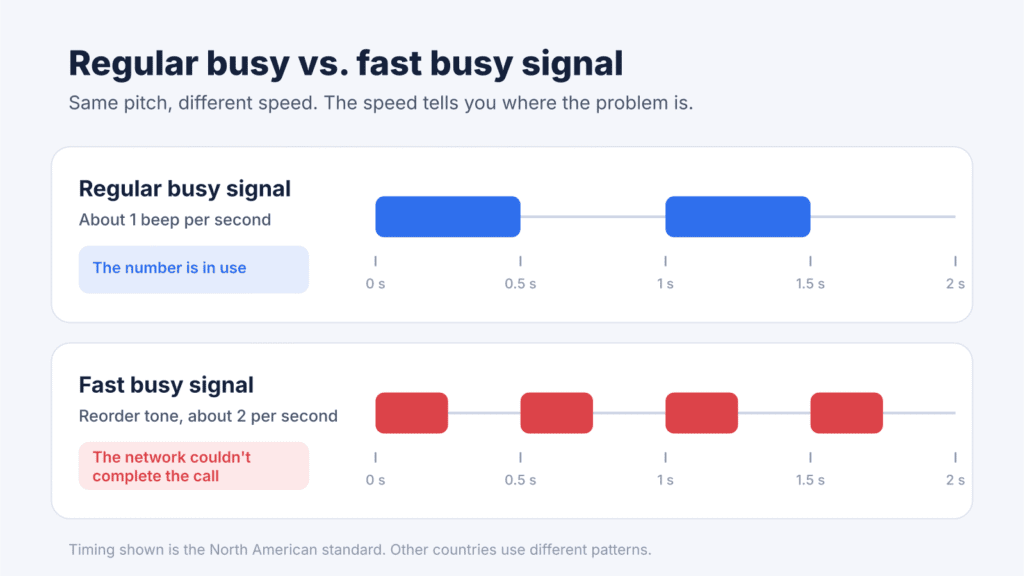
Regular busy signal vs. fast busy signal
The two tones use the same pitch, so they’re easy to mix up. The speed tells you whether the problem is the person or the network.
| Sound | What it sounds like | What it means | What to do |
|---|---|---|---|
| Regular busy signal | Beeps about once a second | The number is in use or can’t accept your call | Wait a few minutes and call again |
| Fast busy signal (reorder tone) | The same beep, about twice as fast | The network couldn’t complete the call: congestion, a routing failure or a dead circuit | Check the number, wait, then retry; contact your carrier if it persists |
| Recorded message | A voice, sometimes after three rising tones | The message states the reason, such as “all circuits are busy” or “number not in service” | Follow what the message says |
| One ring, then voicemail | A short ring before the greeting | The call was declined, blocked, or silenced by Do Not Disturb | Try later or send a message |
| Loud, rapid warbling on your own landline | A harsh alarm-like tone | Your handset has been off the hook too long | Hang up properly and check other extensions |
A fast busy signal typically points to a network or call-routing problem rather than the person simply being on another call. In some countries, networks also use it for an invalid number or a barred call type.
“All lines are temporarily busy” or “All circuits are busy”: what the recording means
Sometimes you don’t hear a busy tone at all. Instead, a recorded voice says something like “All lines are temporarily busy” or “All circuits are busy. Please try your call again later.” These recordings usually come from a carrier network or a business phone system rather than from the phone you’re calling. They indicate that your call couldn’t connect at that time.
- Too many calls at once. CenturyLink explains that an all-circuits-busy message means there aren’t any free outgoing lines, which happens when more people are placing calls than there are lines available. Hang up and try again in a few minutes.
- A problem with the other person’s carrier. Verizon says that when its all-circuits-busy announcement affects only one number, the issue is with the receiving party’s service provider. Try calling another number to check whether the problem affects other calls, then try the original number later.
- A problem with your carrier. If you hear the message no matter which number you dial, the issue is more likely on your own network. Verizon customers can dial *611 for technical support; other carriers have their own support lines.
- A service outage. CenturyLink adds that the recording can also point to an outage, such as a cut cable or equipment damaged by weather.
- A busy business line. A company’s own phone system may play a similar recording when all of its lines are in use. Call back later or use another contact method, such as the company’s website or email.
On their own, these recordings don’t prove that someone has blocked you. If the message appears for only one person’s number for days, see the section on why one number always says busy below.
Why does one number always say busy?
When only one number gives you a busy signal, the cause is almost always on their side or between your two carriers. Work through these checks in order:
- Check the number. Re-enter it with the full country or area code. A missing digit can route the call nowhere.
- Call a different number. If that call connects, your phone can make outgoing calls. The problem likely involves the person you’re calling, their carrier or the routing between your networks.
- Try again later. Wait 10 to 15 minutes, then try at a different time of day.
- Send a message. Try SMS or a messaging app. If the message is delivered or they reply, the problem may be limited to phone calls.
- Call from another phone. If a friend’s phone gets through but yours doesn’t, the problem is specific to your number. That could mean blocking or a routing fault between carriers.
- Think about the line type. A home landline that is always busy may be off the hook or faulty. A business may simply have too few lines at peak times.
If the person tells you their phone never rang, ask them to check the incoming-call settings described further down.
Why does every number I call say busy?
If every call sounds busy or shows “Line busy,” the problem is on your phone, SIM, account or local network. Test a call after each step:
- Restart your phone. This clears most temporary glitches.
- Turn Airplane Mode on, wait five seconds, then turn it off. Airplane Mode doesn’t cause busy signals, but toggling it forces your phone to reconnect to the network.
- Check your signal. Move near a window or outdoors. If you’re on Wi-Fi calling, turn it off and try the cellular network, or the reverse.
- Check your account. Make sure your bill is paid, your prepaid balance covers calls and your plan hasn’t been suspended.
- Look for an outage. Check your carrier’s app, website or social media for service problems in your area.
- Check the SIM or eSIM. Reseat a physical SIM, or confirm the eSIM line is turned on. If you can, test the SIM in another phone.
- Update software and carrier settings. Install any system update and carrier settings update.
- Check call restrictions. Make sure outgoing call barring and Fixed Dialing Numbers are off.
- Reset network settings. This erases saved Wi-Fi networks and passwords, so use it after the simpler steps.
Still no luck? Contact your carrier. The device-specific steps for Android and iPhone are below.
When people get a busy signal calling you
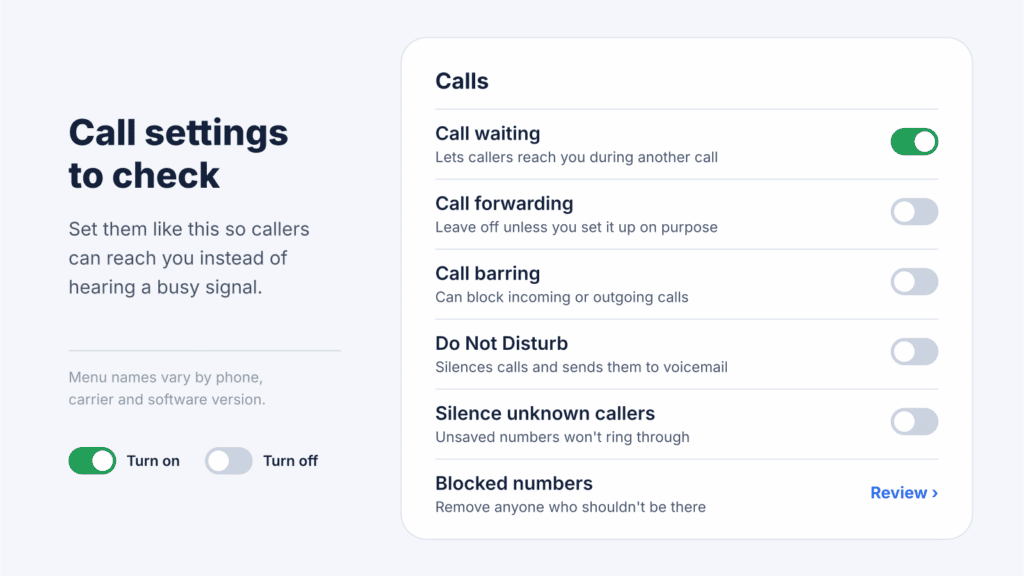
If friends say your line is always busy, or their calls never reach you, the cause is usually a setting on your phone or account. These are the ones to check:
| Setting | What callers experience | What to change |
|---|---|---|
| Call waiting off | Busy tone or voicemail while you’re on another call | Turn call waiting on |
| Call forwarding on | Calls go to another number, which may be busy or invalid | Turn forwarding off or fix the number |
| Incoming call barring | Calls are rejected by the network | Turn barring off in your call settings or ask your carrier |
| Blocked or auto-reject list | Calls are declined automatically | Remove the number from the list |
| Do Not Disturb or Focus | Your phone stays silent and calls usually go to voicemail | Turn it off or allow that contact |
| Silence or block unknown callers | Calls from unsaved numbers are screened or sent to voicemail | Save the caller as a contact or turn the setting off |
| Call-blocking or caller ID apps | A faulty app may reject calls it shouldn’t | Pause or uninstall the app and test again |
| Dual SIM in use | Calls to one line fail while you talk on the other | Turn on Wi-Fi calling for the second line, if offered |
Many GSM carriers also let you check these features with dial codes. On most of them, *#43# shows whether call waiting is on and *#21# shows whether all calls are being forwarded. Codes vary by carrier and country, so check your carrier’s instructions first. Avoid codes that cancel all forwarding: many carriers use conditional forwarding to send missed calls to voicemail, so clearing every rule can break your voicemail.
How to fix line busy problems on Android
Most call settings on Android live inside the Phone app, not the main Settings app. Menu names vary by model, carrier and Android version, so look for the closest match.
| Setting to check | Samsung Galaxy | Google Pixel |
|---|---|---|
| Call waiting | Phone app > three dots > Settings > Supplementary services > Call waiting | Phone app > three dots > Settings > Calling accounts > your SIM > Additional settings > Call waiting |
| Call forwarding | Phone app > three dots > Settings > Supplementary services > Call forwarding | Phone app > three dots > Settings > Calling accounts > your SIM > Call forwarding |
| Blocked numbers | Phone app > three dots > Settings > Block numbers | Phone app > three dots > Settings > Blocked numbers |
| Do Not Disturb | Swipe down from the top of the screen and check the Do Not Disturb tile | Swipe down from the top of the screen and check the Do Not Disturb tile |
Samsung’s own guide lists call waiting and call forwarding under Supplementary services. If that menu is missing, your carrier controls those features, so ask them to check or change the settings.
Then work through these fixes:
- Turn call waiting on so callers can reach you while you’re on another call.
- Turn off call forwarding unless you set it up on purpose.
- Review your blocked list. In the Phone by Google app, tap the X next to a number to unblock it. Also check whether “Unknown” callers are blocked.
- Check Fixed Dialing Numbers. On Samsung, it’s under Supplementary services. If FDN is on, you can only call approved numbers.
- Check VoLTE and Wi-Fi calling. In your mobile network settings, make sure any VoLTE, 4G calling or HD Voice switch is on. Turn Wi-Fi calling off and on again.
- Test without third-party call apps. Pause any call-blocking or caller ID app, then try again.
- Reset network settings. On Samsung, go to Settings > General management > Reset. On Pixel, go to Settings > System > Reset options. Choose the network reset option.
Official sources for these Android steps:
- Samsung Support, Calling features on your Galaxy phone: https://www.samsung.com/us/support/answer/ANS10001907/
- Google Phone app Help, Block or unblock a phone number: https://support.google.com/phoneapp/answer/6325463
How to fix line busy problems on iPhone
These steps follow Apple’s own guide for calls that fail or don’t come through. On iOS 18 and later, phone settings sit under Settings > Apps > Phone. On older versions, look under Settings > Phone. Which options appear, and whether you can change them, also depends on your carrier. Test a call after each step.
- Toggle Airplane Mode. Turn it on, wait five seconds, then turn it off.
- Turn off Do Not Disturb. Go to Settings > Focus > Do Not Disturb. Also make sure no other Focus, such as Sleep or Driving, is active.
- Check blocked contacts. Go to Settings > Apps > Phone > Blocked Contacts and remove anyone who shouldn’t be there.
- Turn off call forwarding. Go to Settings > Apps > Phone > Call Forwarding.
- Turn on call waiting. Go to Settings > Apps > Phone > Call Waiting. If the option is missing or won’t save, your carrier controls it.
- Check unknown-caller settings. On iOS 26, go to Settings > Apps > Phone > Screen Unknown Callers. Silence sends unsaved numbers to voicemail, and Ask Reason for Calling makes callers say who they are before your phone rings. Choose Never if you want every call to ring normally. On iOS 18 and earlier, turn off Silence Unknown Callers in the same menu.
- Check Wi-Fi Calling. Go to Settings > Apps > Phone > Wi-Fi Calling and turn it off and on again.
- Update iOS and carrier settings. Go to Settings > General > Software Update. A carrier settings update appears as a prompt in Settings > General > About.
- Reset network settings. Go to Settings > General > Transfer or Reset iPhone > Reset > Reset Network Settings. This erases saved Wi-Fi passwords.
On iOS 18 and later, the Apple Support app can also run diagnostics on your iPhone’s calling.
Official sources for these iPhone steps:
- Apple Support, If your call fails or you can’t receive calls on your iPhone: https://support.apple.com/118427
- Apple Support, Set up call forwarding and call waiting on iPhone: https://support.apple.com/guide/iphone/iphe9bdd027a/ios
- Apple Support, Manage unknown callers on iPhone: https://support.apple.com/111106
How to fix a busy signal on a landline or VoIP phone
A landline that always sounds busy to callers usually has something holding the line open. Start with the hardware in your home:
- Check every extension. Make sure each handset is hung up, including cordless phones left in talk mode or away from their base.
- Look for other devices on the line. Fax machines, alarm dialers, older modems and satellite TV boxes can all tie up a phone line.
- Unplug everything, then test one phone at a time. Plug in a single phone and ask someone to call you. Add devices back one by one to find the faulty one.
- Test where the line enters the building. Many homes have a main socket or test jack there. If the line still sounds busy at that point, the fault is in the provider’s line, not your wiring.
- Restart VoIP equipment. Unplug the modem, router and phone adapter for 30 seconds, then power them back on in that order. Check that the adapter’s phone or status light shows it’s online.
- Add call waiting or voicemail. If callers hear busy whenever you’re on the phone, ask your provider to add one of these features.
- Report the fault. If none of this helps, your provider can run a remote line test and send a technician.
When to contact your carrier
Call your carrier if every call still fails after the steps above, if a fast busy signal lasts for hours, or if you can’t change call waiting or forwarding yourself. They can see problems that no phone setting will reveal.
Have these details ready:
- The numbers you tried, with the dates and times the calls failed
- Exactly what you heard or saw: a busy tone, a fast busy, a recording or “Line busy” on screen
- Whether it happens with one number or all of them, and on cellular, Wi-Fi calling or both
- What you’ve already tried
Ask them to confirm that your account is set up for your phone, that there’s no outage or billing block, that call barring is off and that VoLTE (and VoNR, if your carrier offers it) is enabled on your line.
Frequently asked questions
What does “all lines are temporarily busy” mean?
It’s a recorded message indicating that your call couldn’t connect, often because of network congestion, unavailable lines or a carrier problem. Wait a few minutes and try again; if it happens for every number you dial, contact your carrier.
Does a busy signal mean someone blocked my number?
No, not on its own. A busy signal usually means the person is on a call, their network is congested or their call settings are sending you away. Some phones and carriers do return a busy tone for blocked calls, but most send blocked callers to voicemail or end the call after one ring.
Why does my call say busy without ringing?
An instant busy signal means the call was stopped before it reached the other phone. Common reasons are call waiting being off while they’re on a call, a rejected or blocked call, network congestion or a routing error. Check the number and try again in a few minutes.
Why do callers hear “line busy” when I’m not on the phone?
Something on your line is turning them away. Check call forwarding, call barring, your blocked list, Do Not Disturb and unknown-caller filters. On a landline, look for an extension left off the hook. If all settings look right, ask your carrier to check your line.
Why do I keep getting a fast busy signal?
A fast busy signal means the network couldn’t complete the call. It’s usually caused by congestion, an outage or a routing problem, and sometimes by a misdialed number. If it happens on every call for more than a few hours, contact your carrier.
Does Do Not Disturb make a phone sound busy?
Usually not. On iPhone and most Android phones, Do Not Disturb silences calls, and callers typically reach voicemail. Network-level “do not disturb” services offered by some carriers can behave differently.
Can Airplane Mode cause a busy signal?
No. With Airplane Mode on, your phone can’t place cellular calls, so it shows a prompt instead of playing a busy tone. Calls can still go out over Wi-Fi calling if Wi-Fi is on. If the person you’re calling has Airplane Mode on, you’ll usually reach their voicemail.
Does a busy signal mean the other phone is switched off?
Rarely. A phone that is off or out of coverage normally sends callers to voicemail or a “not available” message. A busy tone points to a phone that’s on but can’t take your call.
How can I tell whether the problem is my phone or theirs?
Call a different number right away. If it connects, your phone can make outgoing calls, and the problem likely involves the other person, their carrier or the routing between your networks. Then ask someone else to call the original number. If their call gets through and yours doesn’t, the issue is specific to your number.
Can my phone redial a busy number automatically?
Some landline providers offer an automatic busy redial feature, activated with *66 in parts of the US. Availability and charges vary, and most mobile phones don’t offer it. On a mobile, a text is usually the fastest alternative.
Conclusion
A “Line busy” message most often means the person you’re calling is already on a call. The pattern tells you where to look. If one number is busy, give it time, send a message and ask them to check call waiting and forwarding. If every number is busy, the fix is on your side: restart your phone, check your settings and account, and call your carrier if it continues. A fast busy signal points to the network, not the person.

Louis Mugan writes how-to and troubleshooting guides for EasyTechLife, covering Android phones, iPhones, laptops, Chromebooks, headphones and everyday software.
He aims to base each guide on official manufacturer documentation and support pages, and to link the sources so readers can check the steps for themselves. Questions or corrections? Use the contact page.