Barcode and QR code scanner apps turn your Android phone or iPhone into a pocket tool that can look up prices, show product details, save books to a reading list, build grocery lists, or catalog a vinyl collection. Instead of typing long product names, you just point your camera at a simple pattern of lines or squares and let the app do the hard work.
In this guide, you will see how barcode scanner apps work, how they differ from your phone’s built in camera, and detailed reviews of five of the best options for Android and iPhone. You will also learn how to choose the right app for your needs and how to use it safely and confidently.
Key takeaways
- Barcode scanner apps read product barcodes and QR codes with your phone camera and can show prices, reviews, and product details in seconds.
- Dedicated barcode apps go beyond the basic camera scanner with features such as price comparison, history, wish lists, inventory tools, and export options.
- Different apps suit different people. Some focus on shopping and price comparison, some on books and reading lists, some on media collections, and some on grocery and pantry management.
- Built in camera apps on Android and iPhone can already scan many QR codes, but a dedicated barcode scanner app is still useful when you want collections, lists, and better price awareness. Apple Support
- Privacy and permissions matter. Always check what data a barcode scanner app collects, how it makes money, and whether it asks for permissions it does not need.
Insight into barcode scanner apps for Android and iPhone
What are barcode and QR code scanner apps
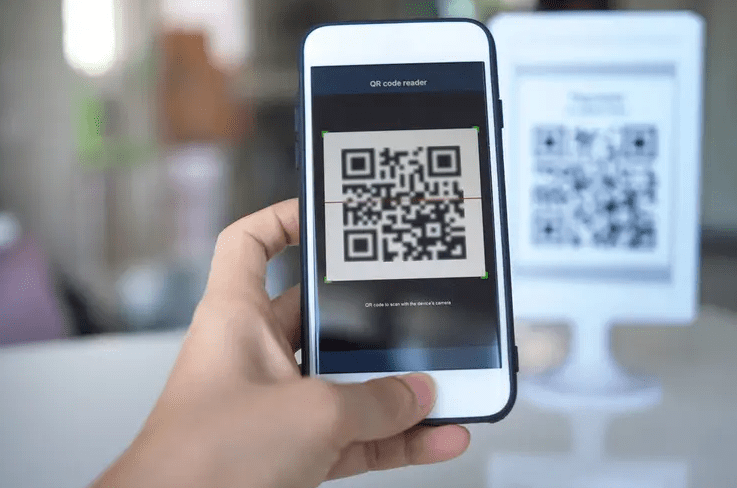
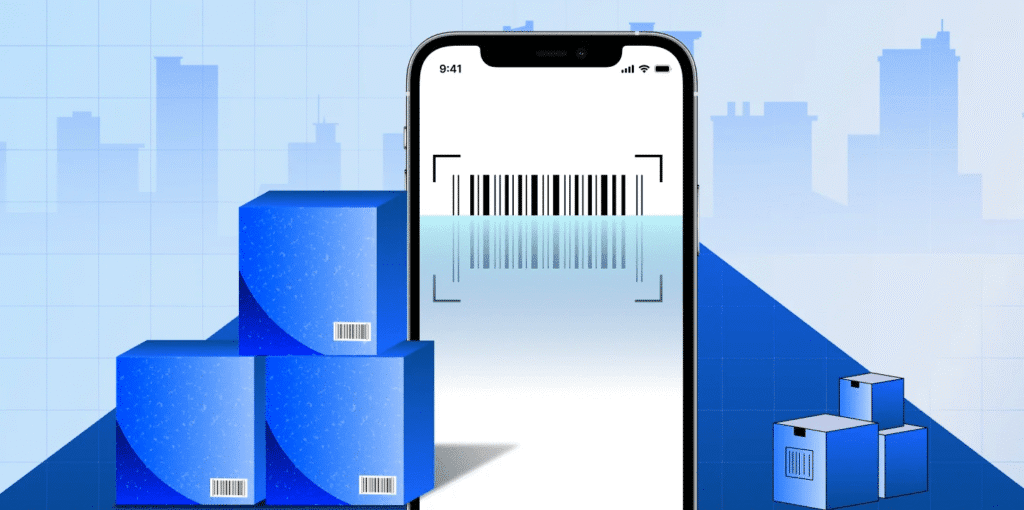
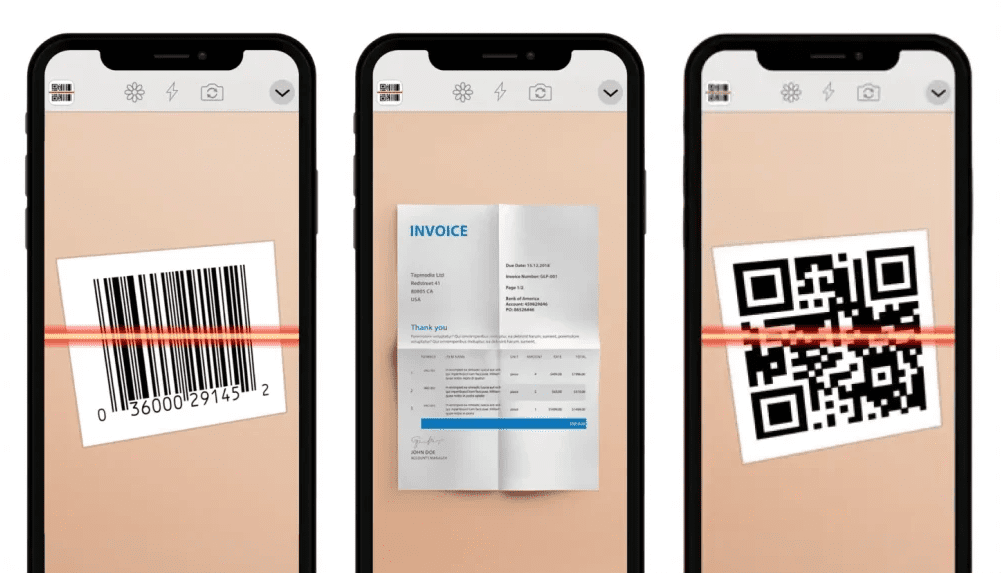
A barcode is a pattern of vertical black lines with numbers underneath. It usually appears on product packaging and stores a product identifier. A QR code is a square pattern made of many small dark and light squares that can hold website links, Wi Fi details, contact information, tickets, and more.
Barcode and QR code scanner apps use your phone’s camera and image recognition to read these patterns. The app decodes the numbers or symbols inside the code and then looks them up in an online database or in its own records. For example, when you scan a grocery item, the app can match the barcode to a known product and show its name, brand, and sometimes pricing or nutrition information.
Why these apps matter in everyday life
Here are some everyday situations where a barcode scanner app is genuinely useful:
- You are in a store and want to know if the price on the shelf is fair. A shopping focused barcode app can scan the product and compare the price with other online and local retailers.
- You are standing in a bookstore and see an interesting novel. A book scanner app can read the barcode or even the cover and save that title to your reading list while also pulling in reviews and average ratings from other readers.
- You are a vinyl fan and want to catalog your records. A collection app can scan the barcode on the record sleeve, match it to a specific pressing, and add it to your online collection with current market values
- You are cleaning the kitchen and notice that you are almost out of rice and coffee. A grocery list app lets you scan each item and add it straight to a collaborative shopping list that your partner also sees. Google Play
- You are at a restaurant and the menu is a QR code. A QR scanner app or your camera can open the menu instantly instead of making you type a long web address. Apple Support
In all of these cases, barcode scanner apps save time, avoid typing mistakes, improve price awareness, and help you keep your life more organized.
How dedicated apps differ from built in camera scanning
Modern Android phones and iPhones can often scan QR codes directly in the camera app. When you point the camera at a QR code, the phone recognizes it and shows a small link or action for you to tap.
However, that built in scanner usually does only one thing. It opens the link, shows the Wi Fi details, or adds a contact. It does not keep a history, does not create grocery lists, and does not track prices or collections.
Dedicated barcode scanner apps add extra features such as:
- Saved scan history and search
- Wish lists and reading lists
- Price comparison across many retailers
- Collection and inventory tools for books, vinyl, or other items
- Export to CSV or spreadsheet for deeper analysis
- Social or community features with reviews and discussions
If you only scan the occasional QR code on a poster, the camera app might be enough. If you want to build lists, track prices, or manage a collection, a dedicated barcode scanner app is worth it.
Step by step guide to choosing and using the right barcode scanner app
Step one: Identify your main goal
Before you install anything, decide what you want the app to do for you.
- If you want to save money while shopping, you need a barcode scanner with strong price comparison and retailer coverage.
- If you are a book lover, you want a book scanner that talks to a reading community and lets you build shelves and reading lists.
- If you collect vinyl or other physical media, focus on an app connected to a large media database.
- If you manage a household, you may want a grocery list app with barcode scanning for pantry items.
Knowing your main goal will help you pick the right app from the five detailed reviews later in this guide.
Step two: Check platform and cost
Next, make sure the barcode scanner app works on your devices and that its pricing is clear.
- Platform support
Many popular scanner apps are available on both Android and iOS through the Google Play Store and Apple App Store. For example, QR Code and Barcode Scanner by TeaCapps and ShopSavvy are available on both platforms, while Goodreads and Discogs also support Android and iOS through their official apps. App Store - Pricing models
Common models include:- Free with ads
Many QR and barcode scanner apps on Android are completely free to download and earn money from ads or optional in app purchases. - Free basic features with optional premium upgrades
Some apps offer extra features such as cloud backup, CSV export, or advanced filters through one time purchases or subscriptions. QRbot, for example, is free to use but reserves some features for paying users. - Subscription based
Certain QR code and barcode scanner apps on the App Store offer free trials, then auto renew at a monthly or yearly rate. Good apps are honest about these prices in the listing, but low quality apps sometimes make this confusing, so always read the pricing section carefully. App Store
- Free with ads
Always check the app’s page in the store to see whether it contains ads, offers in app purchases, or requires a paid subscription for core features.
Step three: Review privacy, permissions, and reputation
Because barcode scanner apps can see what you scan and often have internet access, privacy matters.
- On the store listing, look at the permissions section. A scanning app obviously needs camera access. It may need internet to look up products or back up your lists. If it asks for contacts, precise location, or unrelated data, be cautious.
- Check the privacy section on the App Store or Google Play listing. For example, ShopSavvy indicates that it may use some identifiers and performance data for analytics and tracking, which is useful to know before you install it. App Store
- Look at recent user reviews and the last update date. Active apps like QR and Barcode Scanner by TeaCapps and QRbot have been updated in recent years and continue to receive feedback and improvements, which is a good sign. Google Play
- When in doubt, visit the developer’s website from the store listing and scan their privacy policy.
Step four: Install and run your first scan
For most barcode scanner apps, the first scan looks like this:
- Open the Google Play Store or Apple App Store.
- Search for the app name and check that the developer matches what you expect. Install the official app.
- Open the app. When it prompts you for camera access, grant permission. If it asks for other permissions, check whether they are really needed.
- Place a product barcode or QR code within the viewfinder rectangle on your screen. Hold the phone steady and make sure there is enough light.
- The app should beep or vibrate once it recognizes the code. You will then see information such as the product name, price offers from different stores, or a link to open in your browser.
If the app struggles to scan, wipe your camera lens, move closer or further away, or try in better light.
Step five: Use additional features
Once you are comfortable with basic scans, explore the extra tools that make barcode apps so powerful:
- Save items to lists or collections such as a reading list, a vinyl collection, or a pantry inventory.
- Add custom notes or tags to each item such as store, location, or personal rating.
- Track prices for favorite items using price history or alert features in shopping focused apps like ShopSavvy.
- Export your scan history as a CSV file where supported, for example with QRbot, and open it in a spreadsheet for deeper tracking.
Step six: Consider alternatives and built in options
Remember that many phones already include basic QR code scanners in the camera or quick settings.
- On iPhone, the Camera app and a dedicated Code Scanner shortcut can read QR codes and show links, tickets, and Wi Fi information without a separate app.
- On Android, many phones can scan QR codes directly in the camera, and there is also a system QR scanner accessible from quick settings on recent versions.
Use these built in options for simple QR code tasks. Use dedicated barcode scanner apps when you need extra features such as lists, collections, and price comparison.
The 5 best barcode scanner apps for Android and iPhone – detailed reviews
1. QR Code and Barcode Scanner by TeaCapps (QRbot)
Supported platforms
Android and iOS. Google Play
Best suited for
Everyday users who want a reliable, free barcode scanner app for both QR codes and product barcodes, with history, export, and simple inventory features.
Key features
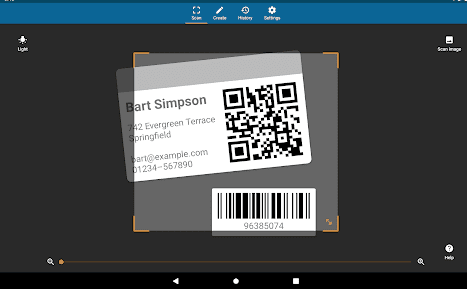
- Scans all common barcode types including QR, Data Matrix, UPC, EAN, Code 128, Code 39, and more. Google Play
- Can generate QR codes for website links, Wi Fi details, contacts, events, and more.
- Keeps a scan history and lets you search, manage, and export it as CSV for use in spreadsheets or cloud storage. App Store
- Can be used as a light weight inventory tracker or quality assurance tool for small businesses.
- Integrates with services such as Amazon, eBay, and Google for quick product lookups. QR Code Generator
Pricing and monetization
The core QR and barcode scanner is free to download. Some advanced features and the removal of ads may require a pro upgrade or subscription, according to the developer’s terms.
Pros
- Very fast and accurate scanning for both QR codes and product barcodes.
- Works on both Android and iPhone with a similar interface.
- Strong support for many code formats and export functions.
- Well reviewed, with ratings around four point five stars out of five as of twenty twenty four, and millions of downloads. QR Code Generator
Cons or limitations
- Some features require a subscription or pro purchase.
- Like many free barcode apps, it may show ads in the free version.
Who should choose this app
Choose this app if you want a general purpose barcode scanner app that can handle almost any code type, work on both platforms, and support history and export without locking you into a heavy shopping or collection ecosystem.
2. ShopSavvy – shopping and price comparison
Supported platforms
Android and iOS. ca.chartoo.com
Best suited for
Bargain hunters and everyday shoppers who want to compare prices across many retailers and track deals with a barcode scanner app.
Key features
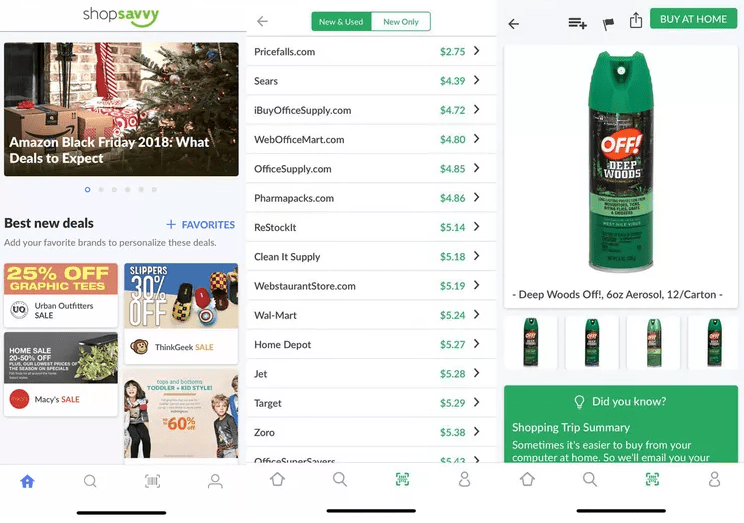
- Scans product barcodes and searches a large database of online and local retailers to show where the item is available and at what price. Google Play
- Shows price history and gives advice on whether it is a good time to buy or if a better sale is likely soon. ShopSavvy
- Can watch products and send alerts when prices drop or when a new deal appears.
- Includes a browser and Safari extension option that helps you check prices while shopping on the web. ShopSavvy
Pricing and monetization
ShopSavvy is free to download and earns money through ads and affiliate links. On Android, the Google Play listing notes that it contains ads and may offer in app purchases. Google Play
Pros
- Very strong at real time price comparison for physical products.
- Clear product pages with links to multiple retailers.
- Extra tools such as price history and watch lists for frequent shoppers.
- Available on both major mobile platforms and in browser form.
Cons or limitations
- Ratings on Android have dropped over the years, and recent reviews sometimes mention glitches or incomplete local pricing data. Google Play
- Heavy shoppers might find the number of deal notifications overwhelming if they enable many alerts.
Who should choose this app
Choose ShopSavvy if your main goal is price comparison. For example, when you are standing in an electronics store looking at a pair of headphones, scanning the barcode can show whether an online retailer offers a lower price and whether a better sale is expected soon.
3. Goodreads – best barcode scanner app for book lovers
Supported platforms
Android and iOS. Goodreads
Best suited for
Readers who want to scan books to add them to shelves, track their reading history, and see community reviews.
Key features
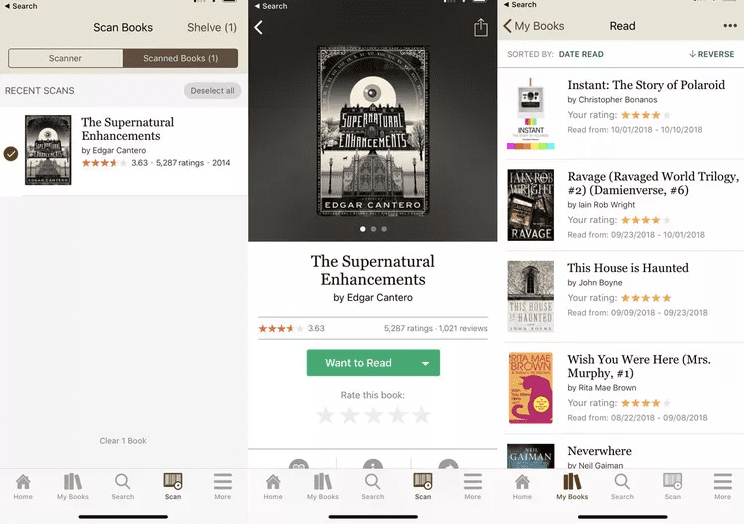
- Built in scanner lets you scan either the barcode or the entire book cover to look up a title. help.goodreads.com
- After each scan, the app shows the book title and cover and lets you add it directly to your Want to Read shelf or another custom shelf.
- Large community with ratings, reviews, and reading lists that help you decide whether a book is worth your time. App Store
- History of scanned books so that you can process them later and file them into the right shelves.
Pricing and monetization
Goodreads is free to use and supported by Amazon. There is no extra fee for using the barcode scanner or reading community reviews.
Pros
- Extremely convenient in bookstores and libraries. You can pull out your phone, scan a spine or cover, and file the book for later.
- Deep social and review features that go far beyond simple barcode scanning.
- Works on both Android and iPhone with similar features.
Cons or limitations
- The scanner focuses on books. It is not meant to be a general barcode scanner for groceries or electronics.
- Pricing comparison is limited. You may see links to buy, but the app does not try to be a full price comparison tool.
Who should choose this app
Choose Goodreads if your main barcode task is scanning books. It is perfect for students, teachers, and heavy readers who want to track what they own, what they have read, and what they want to read next.
4. Discogs – barcode scanner for vinyl and physical media
Supported platforms
Android and iOS. Google Play
Best suited for
Music collectors who want to catalog vinyl records, CDs, cassettes, and other physical media and track their collection value.
Key features
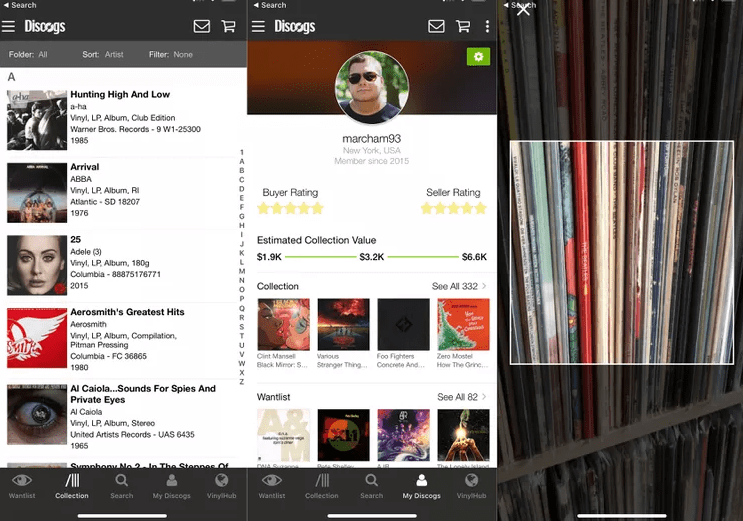
- Official app connects directly to the Discogs database, one of the largest collections of physical music releases in the world. Google Play
- Barcode scanner lets you scan records and other media to add them to your Collection or Wantlist.
- Shows marketplace listings and price ranges for many releases, so you can see approximate value.
- Recent updates have improved barcode scanning and performance, and have refreshed the home page and collection tools. App Store
Pricing and monetization
The app is free to download. Discogs earns money through its marketplace fees on sales and not by charging users for basic scanning and collection tools.
Pros
- Ideal for vinyl fans who want a structured online catalog.
- Deep metadata about releases, including pressing details that go far beyond a simple barcode lookup.
- Good barcode scanner for newer records that include barcodes.
Cons or limitations
- Many older or limited release records do not have barcodes, so you must search and add them manually.
- Most social and community features live on the web interface rather than inside the app.
Who should choose this app
Choose Discogs if you regularly buy or sell physical music and want to build a serious collection database. The barcode scanner is a quick entry point when you pick up a new record and want to log it instantly.
5. Out of Milk – barcode powered grocery lists
Supported platforms
Android and iOS. DivxLand
Best suited for
Busy households and shared apartments that want simple, shareable grocery lists and pantry tracking with barcode scanning.
Key features
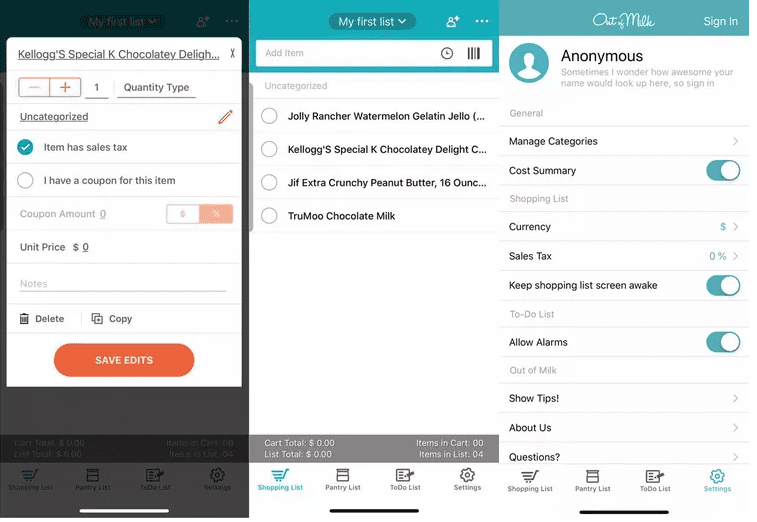
- Lets you create multiple shopping lists, a pantry list, and a general to do list.
- Items can be added by typing or by scanning product barcodes to add them straight to a list.
- Lists sync across devices and can be shared with family members or roommates, so everyone can add items and see updates in real time. Google Play
- Pantry list lets you record what you already have at home so that you avoid buying duplicates.
Pricing and monetization
The core app is free and already includes barcode scanning, list sharing, and pantry features. Some sources mention optional upgrades or premium options that remove ads and add extra features. Out of Milk
Pros
- Designed specifically for grocery lists and household organization.
- Barcode scanner makes it very easy to build a list directly from items in your kitchen.
- Real time list sharing reduces confusion about who is buying what.
Cons or limitations
- Product names and categories often come from your own entries, not from a universal food database, so some manual cleanup is needed.
- No deep price comparison. You can record prices yourself, but the app does not automatically search retailers.
Who should choose this app
Choose Out of Milk if your main goal is to keep your kitchen and pantry under control. It is especially useful for parents or roommates who want a central shared grocery list that anyone can update by scanning empty packages.
Key benefits of knowing the best barcode scanner apps
When you know which barcode scanner app fits your situation, you get several very practical benefits:
- Better shopping and price awareness
Shopping focused apps can help you see when you are about to overpay and whether a better offer exists online or at another local store. - Faster product information
You can scan items to see reviews, ratings, and details instead of typing long names into search bars. - Easier collection management
Book and vinyl barcode apps turn stacks of media into organized digital collections with shelves, want lists, and estimated values. - More organized groceries and pantry
Grocery list barcode apps reduce forgotten items and prevent buying duplicates. They help you waste less food by reminding you what you already have. - Less manual typing and data entry
Scanning a barcode takes a second. Typing a full product name or ISBN can take much longer and is more error prone. - More confidence with QR codes
Familiarity with scanner apps and built in camera scanners helps you handle QR codes in public in a calm and secure way.
Mistakes to avoid
Barcode and QR code scanner apps are powerful, but there are real pitfalls to avoid.
- Installing the first random scanner app without checking reviews
Some low quality scanner apps show aggressive ads, use confusing subscription trials, or request unnecessary permissions. Always check ratings, recent reviews, and update history in the store listing. - Ignoring privacy and permissions
If a scanner app asks for contact access, precise location, or background activity that does not match its purpose, that is a red flag. Use apps with clear privacy practices and reasonable permissions only. - Falling into expensive subscriptions for simple needs
Many iOS scanner apps offer a free trial and then start a subscription that can be costly for what is basically a basic QR code scanner. Read the subscription section on the App Store page and cancel any free trial if you are not sure. App Store - Relying on outdated or abandoned apps
If the last update was several years ago, the app may not work correctly with modern Android or iOS versions and could even have unresolved bugs or security issues. - Scanning malicious QR codes without thinking
QR codes in random emails, stickers on top of existing codes, or untrusted websites can point to phishing pages. Modern guidance from security and tech sites recommends treating QR codes like links from strangers. If something looks odd, do not scan it or check the URL carefully before you tap.
Expert tips and real life examples
Real life examples
- Saving money in store
A shopper in an electronics store scans a pair of headphones with ShopSavvy. The app shows that a well known online retailer is offering the same model at a noticeably lower price and that the price has dipped in recent weeks. The shopper decides to order online instead of paying the higher shelf price. ShopSavvy - Tracking a student reading list
A university student takes a weekend trip to the library. Using Goodreads, they scan each recommended book’s barcode or cover, adding it to a shelf for the upcoming semester. Later, they sort the shelf by priority and use community reviews to decide which titles to start first. help.goodreads.com - Cataloging a vinyl collection
A vinyl collector buys several new records, scans their barcodes with the Discogs app, and adds them to a Collection with automatic price ranges. Over time, the collector can see trends in collection value and avoid buying duplicate versions of the same album. - Managing a family grocery list
A parent empties a cereal box and scans its barcode into Out of Milk. The item appears on a shared grocery list that their partner sees on their own phone. On the next store trip, they know exactly which brand and size to buy.
Expert style tips
- Use tags or categories in your scanner app so that you can filter scans by store, room, or project later.
- For serious inventory use, export the scan history to CSV where supported and keep a backup in a cloud drive.
- Regularly clear unnecessary scan history if you are concerned about privacy. Many apps let you delete or anonymize your scan records.
- When you only need to open a QR code, try the built in camera scanner first. Use third party barcode apps mainly when you need extra features.
Frequently asked questions
Q1: Do I still need a barcode scanner app if my phone camera can scan QR codes
Modern Android phones and iPhones can scan many QR codes directly in the camera app. This is enough for simple actions such as opening a website link or viewing a digital ticket. However, dedicated barcode scanner apps are still useful when you want features such as price comparison, reading lists, grocery lists, or inventory tracking that the basic camera cannot provide. Apple Support
Q2: Are free barcode scanner apps safe
Many free barcode scanner and QR code scanner apps from reputable developers are safe when you install them from the official Google Play Store or Apple App Store and review the permissions they request. Focus on apps with clear privacy policies, active updates, and good average ratings. Avoid apps that ask for unnecessary permissions such as contacts or background location for simple scanning tasks.
Q3: Can I use barcode scanner apps without an internet connection
Most scanner apps can read the code itself offline, but many features require internet access. For example, product lookups, price comparison, and community reviews need a connection to remote servers. Some apps allow offline scanning and then sync your history when you go online.
Q4: Which app is best for comparing in store prices
For classic price comparison with a barcode scanner, ShopSavvy is a strong choice because it focuses on scanning product barcodes and comparing prices across a large retailer database, with tools for price history and deal alerts. QR and Barcode Scanner by TeaCapps can also look up products on popular services such as Amazon, eBay, and Google, which is useful for quick checks. qrbot.net
Q5: How can I scan a QR code that is on my phone screen
You usually cannot point the camera at your own screen. Instead, you can use tools like Google Lens or similar features in Google Photos on Android, or Live Text and Photos on iPhone, to scan QR codes that are already in screenshots or pictures. Some third party scanner apps also offer an option to import an image and scan the QR code inside it.
Conclusion
Barcode and QR code scanner apps turn your Android or iPhone into more than just a camera. They help you compare prices in store, manage books and vinyl, build grocery and pantry lists, and handle QR codes in everyday life with more confidence.
In this guide you saw five standout apps:
- QR Code and Barcode Scanner by TeaCapps for general scanning and history export.
- ShopSavvy for bargain hunters and price comparison.
- Goodreads for book lovers who live by their reading lists.
- Discogs for music collectors who care about vinyl and physical media.
- Out of Milk for families who want shared grocery lists and pantry tracking.
To choose the best barcode scanner app for you, start from your main goal, confirm that the app supports your devices, review its pricing and privacy, and then test it with a few real products. Build a habit of checking permissions, reading reviews, and scanning links thoughtfully so that you get the benefits of barcode and QR code scanning without unnecessary risk.
With the right app and a little care, your next scan can save you money, keep your shelves organized, and make everyday tasks just a little easier.

Louis Mugan is a seasoned technology writer with a talent for turning complicated ideas into clear, practical guidance. He focuses on helping everyday readers stay confident in a world where tech moves fast. His style is approachable, steady, and built on real understanding.
He has spent years writing for platforms like EasyTechLife, where he covers gadgets, software, digital trends, and everyday tech solutions. His articles focus on clarity, real-world usefulness, and helping people understand how technology actually fits into their lives.
Outside of his regular columns, Louis explores emerging tools, reviews products, and experiments with new tech so his readers don’t have to. His steady, friendly approach has made him a reliable voice for anyone trying to keep up with modern technology. get in touch at louismugan@gmail.com